Renaming keeps the device paired
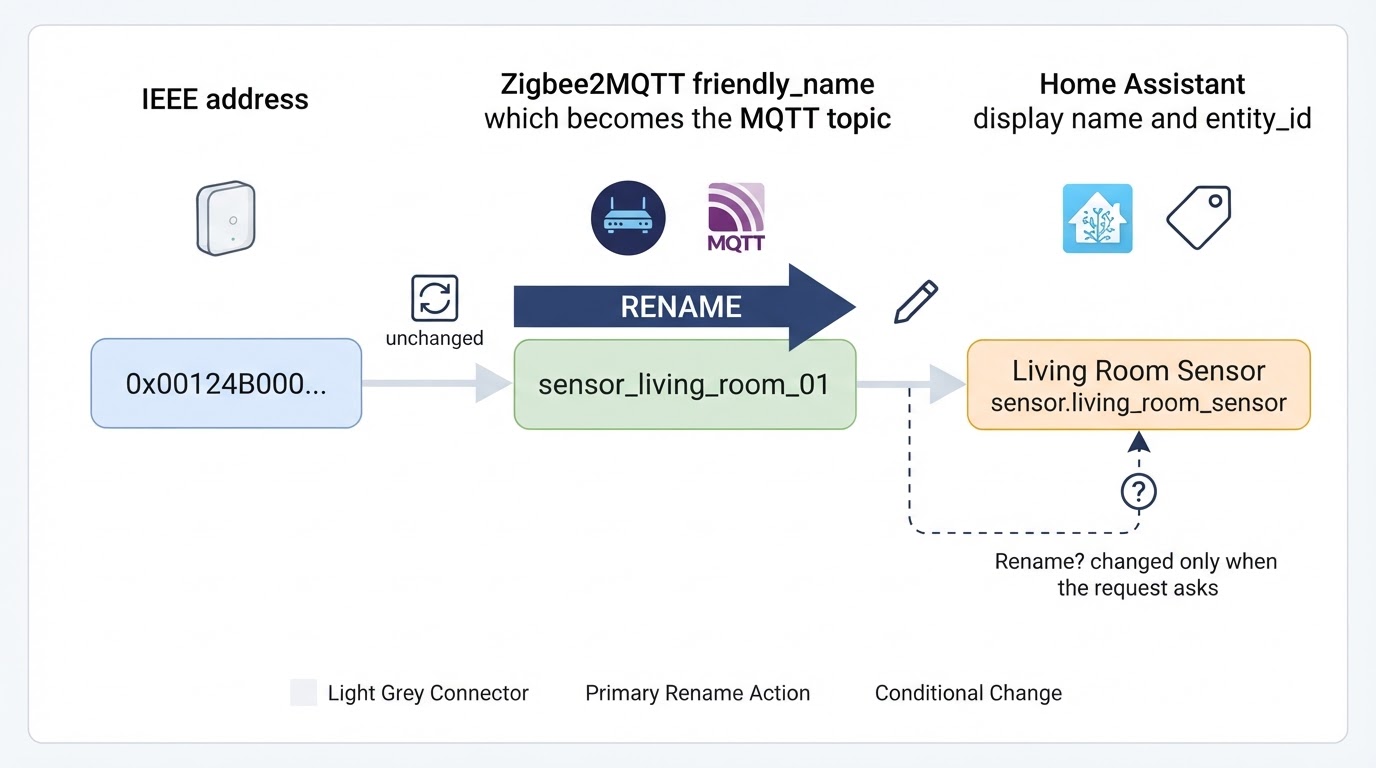
A rename does not touch the Zigbee network identity. The device keeps its IEEE address, its pairing, and its existing bindings; Zigbee2MQTT only changes the human-readable friendly_name, and the MQTT topic moves with it. Home Assistant is a separate layer, so its name and entity IDs change only when you explicitly ask for that. You do not need to re-pair, remove, or re-interview the device. Bindings are a separate topic from naming: if a binding stops working, work through the checks in the Zigbee2MQTT binding troubleshooting guide rather than renaming the device again.
The four names on one device
The Zigbee2MQTT documentation treats the IEEE address and the friendly_name as interchangeable identifiers: the FRIENDLY_NAME part of a topic is either the IEEE address or the friendly name you assigned (MQTT topics and messages). A friendly name can contain a slash, so kitchen/ceiling_light becomes a two-level MQTT folder and a rename can reshape your topic tree rather than rename one leaf.
Keep these four apart:
Illustrative workflow diagram for zigbee2mqtt rename device.
- IEEE address - the stable identity written into the network; it does not change when you rename.
- Zigbee2MQTT friendly_name - the name in the MQTT topic and in the rename payload; it changes immediately.
- Home Assistant display name - what you read in the UI; it can be set separately from the friendly name through the device's
homeassistant.namesetting (Home Assistant integration). - Home Assistant entity_id - the automation-facing identifier; it only follows the rename when the request asks discovery to update it.
Check what points at the old name first
Before publishing a rename, list the references to the old name. MQTT automations and template sensors that subscribe to a raw topic such as <base_topic>/<old_name>/... follow the friendly name and break the moment the topic moves. Home Assistant automations that target entity IDs keep working while those IDs stay the same, and break if the rename updates them underneath.
Back up the Zigbee2MQTT configuration and any Home Assistant automations that touch the device, so the change stays reversible. Do not delete database.db or network.db, clear devices.yaml, wipe the network, or re-pair the device to resolve a naming problem: this guide does not recommend those destructive operations.
Send the rename request
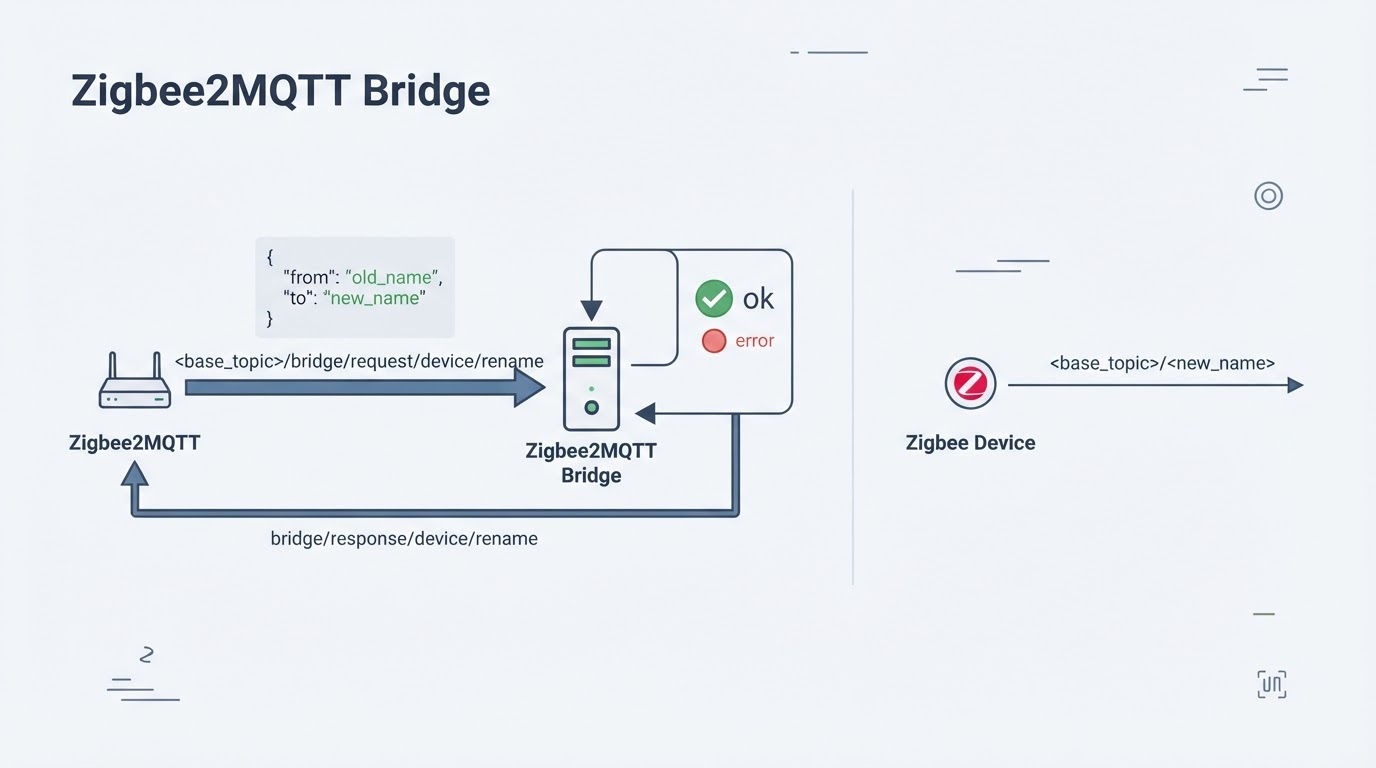
The documented request goes to your base topic plus /bridge/request/device/rename. zigbee2mqtt is only the default base topic; if you changed it in configuration.yaml, use your own value. The payload accepts the current friendly name or the IEEE address in from:
{"from":"old_name","to":"new_name"}Add homeassistant_rename: true when Home Assistant discovery is in use and you want to ask discovery to update the entity IDs to match the new name. The official integration guide documents this option as the mechanism to request that update; it is not a promise that every entity ID, dashboard, script, or automation reference changes. When you omit the option, check the existing entity IDs and any raw-topic references rather than assuming every automation still works, and note that entities can also be renamed separately in Home Assistant. Zigbee2MQTT answers on bridge/response/device/rename with status: "ok" or an error, and echoes a transaction value when you include one. If you just paired the device and have not renamed it before, you can omit from and set "last": true to target the most recently joined device.
Illustrative workflow diagram for zigbee2mqtt rename device.
Decision table for the Home Assistant side:
Situation | homeassistant_rename | Result |
|---|---|---|
Entity IDs are already wired into automations | Omit or | Entity IDs stay unchanged; check the existing IDs and raw-topic references instead of assuming every automation keeps working |
The device was just paired or has no entity references yet |
| Home Assistant discovery is asked to update entity IDs; verify the result afterward |
An automation subscribes to the raw MQTT topic | Either value | The topic changes anyway; update the subscription |
Verify the rename
After the response reports success, confirm the new topic: <base_topic>/<new_name> should report state and accept a control command. If you sent homeassistant_rename: true, check whether the entity and device registry entries show the new name, then run one automation that used the old name. Update every direct-topic reference to the new topic. A rename can succeed at the MQTT layer and still leave stale references behind, so run both checks.
Troubleshooting a rejected rename
A rejected request comes back with an error on the response topic, most often because the target name is already in use. Read the response, inspect the names already in use in the device list, and choose an unused name; if the rejection persists, check the current Zigbee2MQTT documentation for the matching error rather than editing a guessed devices.yaml entry. Do not clear devices.yaml or delete the database just to free one name: this guide does not recommend those destructive operations.
Where to check the surrounding setup
Connected Home Notes publishes step-by-step Home Assistant and Zigbee2MQTT guides, including a walkthrough for Home Assistant Zigbee2MQTT setup. If you are still assembling the stack, it is a useful companion to the official reference pages.