Why the automation runs while the state still reads on
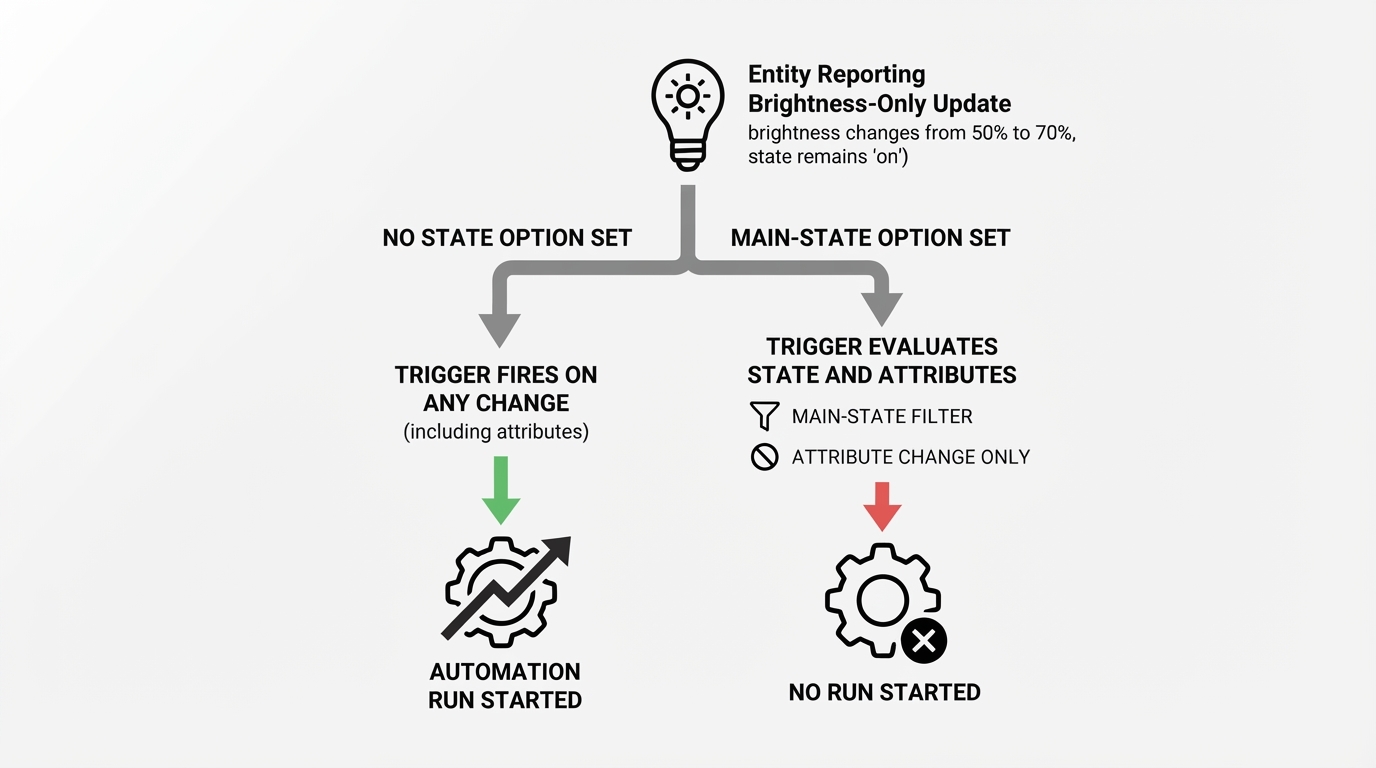
The State changed trigger watches one entity. With no filter set, an attribute update is enough to start the automation. Home Assistant's State changed trigger reference describes that default directly: set none of from, to, not_from or not_to, and a change that touches only an attribute still fires the trigger.
That is what makes the run look wrong. A light that is already on can report a new brightness, a new color temperature, or a new color mode without ever leaving on, and the trigger is not comparing on with on. It is reacting to the update the entity reported.

A dimmer slide, an adaptive-lighting step, or a group turning the brightness down a notch can each look like an event. Nothing is broken; the trigger was configured to watch everything the entity reports.
A condition that checks for on does not rescue this, and it is worth being precise about why. A condition is evaluated after the run has started, and while the light is on a brightness-only change passes that check, so the actions still run. What the condition blocks is a run that begins while the light is off. Conditions decide whether the actions continue; they are not a way to stop a trigger from firing.
Put the main state in the trigger
Setting any one of from, to, not_from or not_to changes what counts as a change, and with one of them present an attribute-only update no longer fires the trigger. The same reference states that rule directly.
Trigger for a change into on:
triggers:
  - trigger: state
    entity_id: light.kitchen_counter
    to: "on"
to: "on" matches one specific new main state, and the quotes keep the value a string rather than a YAML boolean. Because a to option is present, a brightness update on its own no longer starts the automation, while switching the light on still does.
from: "on" narrows the trigger the same way for the other side of the transition, when the event you care about is the light leaving on. Both options also accept a list when more than one state counts.
to: null is a state filter, not the word null
The option that causes the most confusion is to: null. In the visual editor it appears as Any state (ignoring attribute changes). In YAML the key stays present and the value is an empty YAML value:
Trigger that reacts only when the main state changes:
triggers:
  - trigger: state
    entity_id: sensor.utility_power
    to: null
Read that as any new main state, but only when the main state actually changes. The trigger still fires on every real transition rather than one fixed value, and it stops treating a new attribute as a state change.
Writing to: "null" asks for something else. YAML reads the quoted form as a four-character string, so the trigger waits for a new state literally named null. An ordinary light, switch or sensor does not report that, and the trigger stays quiet. from: null does the same job for the starting side of a transition.
Watch one attribute on purpose
Sometimes the attribute really is the thing you want. attribute: brightness makes the trigger watch that attribute value instead of the main state.
Trigger on brightness values only:
triggers:
  - trigger: state
    entity_id: light.kitchen_counter
    attribute: brightness
This is a different watcher from to: "on". It reacts when the brightness value changes, whether the light stayed on or was switched on in the same update, and on its own it has no idea what the main state was. It does not replace a main-state filter.
When the useful question is whether brightness changed while the light was on, pair the attribute watcher with a condition on the main state:
conditions:
  - condition: state
    entity_id: light.kitchen_counter
    state: "on"
The pair works in one direction only. A brightness change while the light is on satisfies the condition, so those runs proceed; the condition does not suppress them. What it blocks is a run that starts while the light is off, such as a brightness attribute that resets or disappears as the light turns off. That reset is an attribute change, the trigger reacts to it, and the condition keeps the actions from continuing. If brightness-only updates should never start a run at all, the filter belongs in the trigger, as to: "on" or to: null does.
When attribute is set, from and to compare against the attribute value rather than the main state. Check the attribute name the integration reports before relying on it, because a name that does not match leaves you with a trigger that never fires, which reads like an entirely different problem.
A test that shows which watcher you have
Reading the YAML is not always enough, especially when a blueprint or an integration supplies the trigger. Two real changes at the entity settle it.
- Change only the attribute. Nudge the brightness from a phone app, a wall dimmer, or an adaptive-lighting step, and leave the on/off state alone.
- Then switch the light off and back on.
Open the automation's traces and compare the two moments. A run after the on/off change but none after the brightness change means a main-state option is filtering attribute-only updates. Runs after both changes mean the trigger has none of those options, or attribute is set and is watching that value. A run that starts and immediately stops at a condition means the trigger fired and the condition blocked the actions, which is a different outcome from the trigger never firing.
The testing documentation covers trace inspection and the difference between a real trigger and a manual run.
The one shortcut to avoid is the editor's Run actions command. It runs the action list while skipping the triggers and the automation's top-level conditions, so it exercises the actions and says nothing about whether the trigger reacts to a brightness update. Conditions inside the action sequence still run, which is worth knowing when a manual run behaves differently from a real one.