The check happens on opposite sides of a round
repeat while evaluates its conditions before each round. If they are already false when the block is reached, the actions inside never run: the loop is skipped and the rest of the script continues. The repeat while page states that the conditions are checked before each round and that when they are not met at the start, the actions do not run at all (Repeat while).
repeat until evaluates after each round. The sequence always executes once before the loop asks whether it should stop, which is why the page frames it as trying again until something works. Its own example runs a shell command that is described as unreliable, waits 200 milliseconds for the device to respond, then stops when a binary_sensor reports on (Repeat until).
So the choice is not stylistic. A Home Assistant while loop whose condition is false at entry does nothing at all, and an until loop whose condition is already true at entry still runs one round.
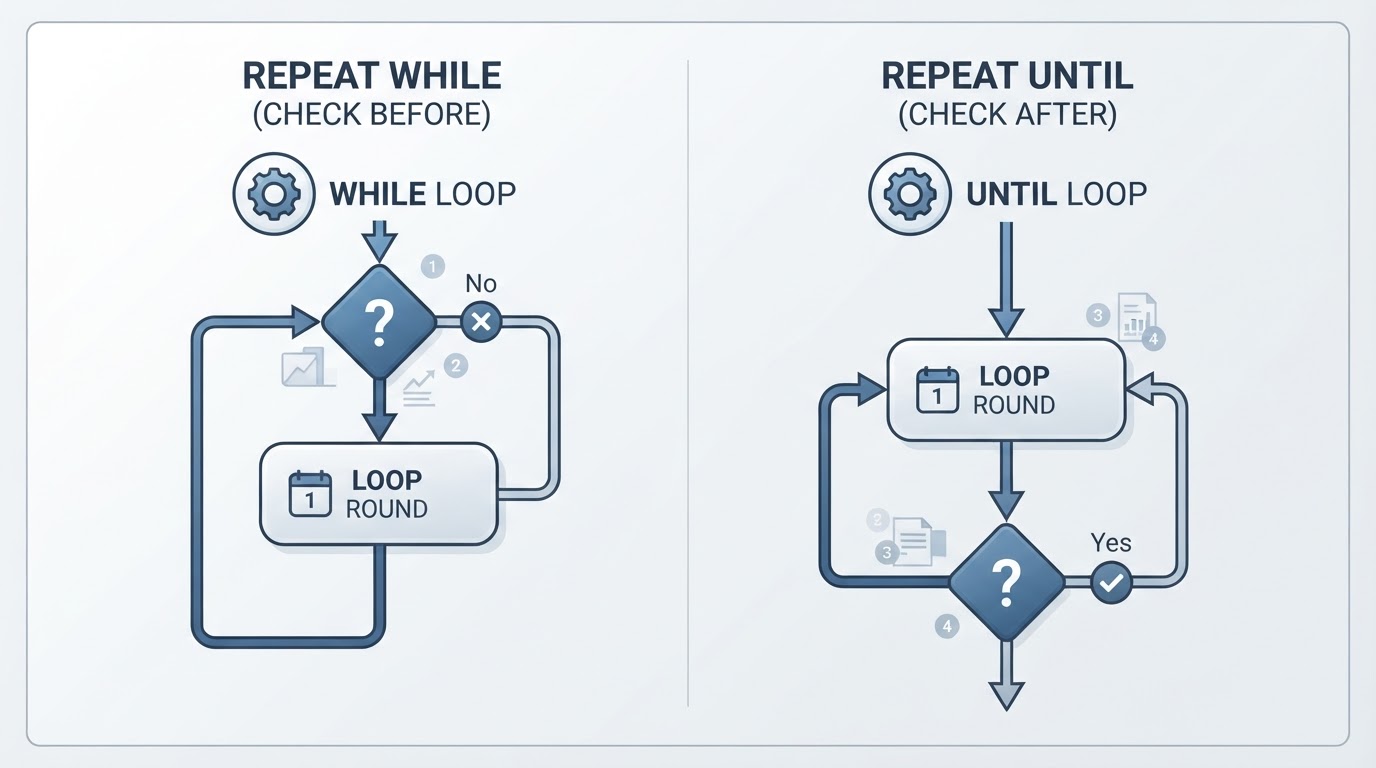
The two loops side by side
Behaviour |
|
|
|---|---|---|
Conditions checked | Before each round | After each round |
Rounds when the condition is already settled at entry | Zero | One |
Ends when | A while condition stops being met | All until conditions are met |
Typical mistake | Assuming the loop will start | Assuming the first round is checked first |
The second row is what changes a real automation. A skipped round and an extra round can look similar in a trace, but they mean opposite things: one loop never asked, the other acted before asking.
A worked pair of loops
Create an input_boolean helper called loop_demo and use it as the switch both loops read. The YAML is written the way scripts appear in configuration.yaml, where each script sits under the script: key with its own name. When you edit a single script in the UI's YAML mode you get that script's own block, so you paste the sequence: list without the script name or the script: key. The three-round cap and five-second delay are illustrative choices for showing the behaviour, not Home Assistant limits, and this is not a tested script.
script:
  loop_demo_while:
    sequence:
      - alias: "Repeat while loop_demo is on, at most 3 rounds"
        repeat:
          while:
            - condition: state
              entity_id: input_boolean.loop_demo
              state: "on"
            - condition: template
              value_template: "{{ repeat.index <= 3 }}"
          sequence:
            - action: persistent_notification.create
              data:
                title: "Loop demo"
                message: "Round {{ repeat.index }}"
            - delay:
                seconds: 5

  loop_demo_until:
    sequence:
      - alias: "Repeat until loop_demo is off, at most 3 rounds"
        repeat:
          sequence:
            - action: persistent_notification.create
              data:
                title: "Loop demo"
                message: "Round {{ repeat.index }}"
            - delay:
                seconds: 5
          until:
            - condition: or
              conditions:
                - condition: state
                  entity_id: input_boolean.loop_demo
                  state: "off"
                - condition: template
                  value_template: "{{ repeat.index >= 3 }}"
repeat.index starts at 1, so the while cap repeat.index <= 3 allows rounds 1, 2 and 3 and refuses a fourth. The until cap repeat.index >= 3 becomes true after round 3 and ends the repeat there. The two blocks bound the same three attempts with opposite comparisons because they are evaluated at opposite moments. repeat.index and repeat.first come from the repeat block itself, so there is nothing to declare; if you need to know which runs see a value you define in your own sequence, the site's guide to Home Assistant automation variables covers that scope.
Three rounds of five seconds are not a 15-second timeout, and a round cap is not an elapsed-time limit. The cap counts rounds. Each round lasts at least its delay plus however long its actions take, and by default a step that fails ends the run, so the loop can finish earlier or later than that arithmetic suggests. If you need a wall-clock deadline rather than a number of attempts, a round count will not give it to you.
Why the cap needs an Or inside repeat until
Both blocks treat their condition list as a set that has to hold in full: the while page says the actions run while every condition is met, and the until page says the repeat ends when all until conditions are met (Repeat while, Repeat until).
For repeat while, that is what you want from a cap. The loop continues while the flag is on and the round number is within the cap; when the index passes the cap, the list is no longer fully true and the loop stops. That is why the official while example lists input_boolean.do_something and {{ repeat.index <= 20 }} as two separate conditions.
For repeat until, listing the two conditions separately does not produce a cap. Because every entry has to be true, the loop stops only when the flag is off and three rounds have run. If the flag never turns off, the index condition passing 3 changes nothing and the loop keeps going with no upper limit at all, which is the case where you most wanted one. If the flag turns off during round 1, the loop still performs rounds 2 and 3 before the index condition lets it exit. With a notification that is only noise; with an action that has side effects it means acting again after success.
The until page documents the shape that does cap it: put the success condition and the round limit in one Or condition, as the example above does, so the repeat ends when the actions work or when the round limit is reached. The Or is what turns "success and cap" into "success or cap".
A condition change during a delay is read at the next boundary
The check points are the round boundaries. A delay belongs to the round it sits in, so nothing in the documented behaviour re-reads the while or until conditions while the delay is counting down. Turning the flag off two seconds into a five-second delay does not cancel the remaining three seconds; the next evaluation happens when that round ends.
That matters when the state you are waiting for usually arrives inside the wait. The rest of the round can pass before the condition is read again, so a ten-minute delay can leave up to ten minutes between the change and the next check. A condition that changes during the delay waits for the round to finish before it is read.
A Condition action placed after the delay cannot give you an earlier check either. The delay finishes before that step is evaluated, so the condition cannot interrupt the wait; it reads the state at the moment it runs, and the Condition page notes that it is not checked again later (Condition).
What a failing Condition does is narrower than stopping the script. The same page limits it to the sequence it sits in: inside a Repeat it ends only the current round, and the repeat's own while or until check then decides whether another round starts. The steps after the loop still run. Ending the entire automation or script is a different step: the Stop building block ends the whole run rather than one block (Stop).
A cap is a bound, not proof that the action worked
repeat.index counts rounds. Reaching the cap tells you how many attempts the loop made, not whether the light, lock or service reached the state you wanted. The official until example keeps the two apart: its shell command is described as unreliable, and the until condition reads a separate binary_sensor for the state that would mean the command worked.
If your loop's only exit is a cap, make the outcome explicit afterwards: check the entity state after the loop, or send the notification from an if block that tests the state, so the run reports what happened rather than only how many times it tried. Keep non-idempotent actions out of retry loops as well. If repeating an action twice would be wrong, the loop needs a state check before the action, not only a round cap.
Loop conditions are not automation modes
Modes decide what happens when an automation starts again during a run. Single does not start a second run and logs Already running; restart stops the current run, including a delay or wait that is running, and starts over; queued starts the new run after the earlier ones finish; parallel runs another copy at once (Automation modes).
The same page explains why a loop can appear to jump: when Home Assistant itself restarts, every run stops and a delay, wait or trigger duration in progress is lost, so the automation does not continue afterwards. A restart-mode automation can also begin an entirely new run after a new trigger, with its own fresh loop.
None of these settings changes when a repeat block checks its conditions. When a loop seems to have run twice, separate the two causes first: a second automation run is a new loop, while a loop that keeps going past its condition is a boundary issue.
Check the timing in your own installation
The fastest way to see the two check points is to watch them happen with a helper you control:
- Create an
input_booleanhelper, for exampleinput_boolean.loop_demo, and leave it off. - Run the while script from the example. It sends nothing, because its condition fails before the first round.
- Turn the helper on and run it again. It notifies once per round, stops when you turn the helper off, and refuses a fourth round.
- Run the until script with the helper already off. It still notifies once before it checks.
- Open the script's trace after each run. The rounds appear as repeated steps, and the timestamps show when each delay ended and when the next condition check happened.
- Turn the helper off during a delay to see that the notification for that round has already been sent and the delay still finishes.