Onboarding fails in one of three layers
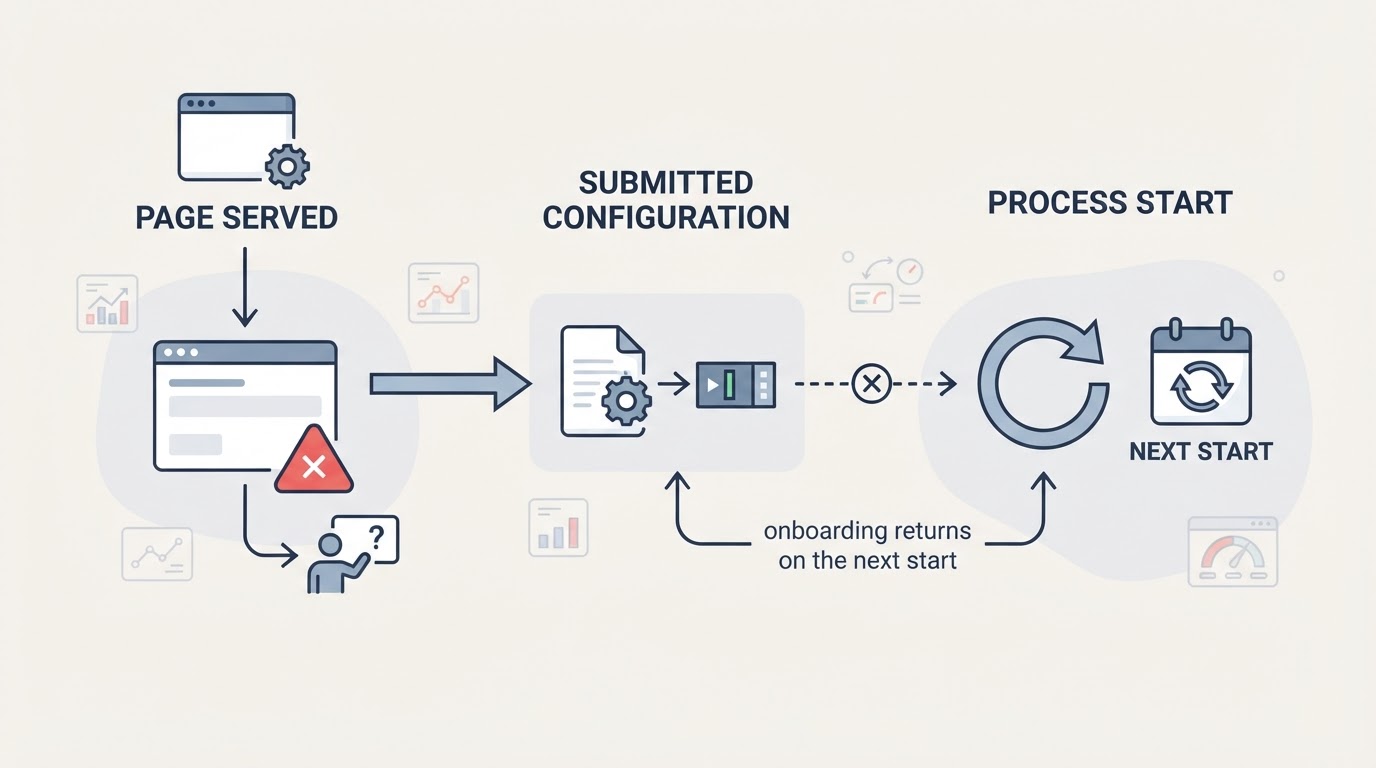
Zigbee2MQTT shows the onboarding page automatically on first run, when no configuration.yaml exists. That page sits on top of three moving parts: the frontend that serves it, the configuration you submit, and the process that must start afterwards. Each one fails differently, and each needs a different first check.
The official getting-started guide documents the onboarding page at the same URL as the frontend — port 8080 on the same machine by default — and notes that the URL may differ for setups such as Home Assistant. So ask how your installation exposes the frontend, not which address is correct in general.
Is the page served at the address you opened?
The address depends on the installation:
- Home Assistant add-on: the frontend port cannot be changed; the add-on forces port 8099 because Home Assistant Ingress requires it, as documented on the frontend page. You reach Zigbee2MQTT through Home Assistant rather than choosing a port yourself.
- Docker: the frontend port has to be published from the container to the host. The documented example maps
-p 8080:8080, and configuration lives in/app/data(Docker guide). If you changefrontend.port, publish the new port too. - Standalone install: the frontend's own address on the machine running Zigbee2MQTT is the documented default.
Two settings can make a healthy install look broken: disable_ui_serving: true stops serving the UI while keeping the WebSocket, and Z2M_ONBOARD_NO_SERVER=1 disables the onboarding server. A custom Z2M_ONBOARD_URL must point somewhere the browser can reach.
Match the symptom to one check
What you see | What it usually means | Do this first |
|---|---|---|
Connection refused at the address you guessed | The page is not served there on this install | Confirm how your install exposes the frontend: Ingress, a published port, or the standalone default |
The adapter list is empty | Serial and mDNS discovery found no adapter | Refresh to re-run discovery, then enter the adapter path and type manually |
The form submits, then returns a validation error | The configuration you submitted cannot be validated | Read the error detail on the page, then re-check the adapter path, type and MQTT settings |
Onboarding appears again on the next start | Zigbee2MQTT failed to start with the accepted configuration; a wrong adapter path is the documented example | Read the first error in the log before resubmitting |
The page never appears at all | UI serving or the onboarding server is off, or a custom URL points elsewhere | Check |
The page hangs and the process will not exit | A failure page is deliberately holding the process open | Close the page, or exit the process manually |
The last two rows are the ones people misread. Failure pages hold the node process from exiting until the page's Close button is used, so a process that looks stuck may be waiting for you. And when a submission fails to start Zigbee2MQTT, the next start runs onboarding again instead of showing a persistent error — that is the loop, not a second bug.
Check the adapter path and type
The onboarding form sets the adapter path and adapter type, and discovery only searches serial and mDNS-discoverable devices; refreshing the page re-runs it. When discovery is unavailable, enter both values by hand.
In Docker, two details explain most empty adapter lists: use the stable /dev/serial/by-id/... path on the host instead of a kernel-assigned tty name, and mount /run/udev:/run/udev:ro, which the documentation lists as required for auto-detecting the adapter. The adapter type must also match the coordinator's firmware stack — the docs keep separate pages for zStack, EmberZNet, deCONZ and others.
Treat MQTT as a prerequisite, not a detail
An MQTT broker is a documented prerequisite, and the form collects the MQTT server details next to the adapter settings. If the broker runs on the same host as a Docker container, the container needs a reachable address — the Docker guide suggests the bridge address, for example mqtt://172.17.0.1. An unreachable broker, or a credential it rejects, stops the process from completing its start even when the page looks fine.
Read the log before editing the form again
The page can only report what it checked; once the process starts, the log is the better witness. Read the first error line rather than the last. If it points at the adapter or MQTT, fix that layer before resubmitting — every submission restarts the process from the same failing state.
Confirm the process can write its data directory
Docker stores Zigbee2MQTT's configuration in /app/data, backed by the directory you mount. Running the container as a non-root user with --user, or the SELinux :z mount suffix, changes who writes there. If the process cannot create configuration.yaml, the next start still sees no configuration — the documented trigger for onboarding — and the page appears again. Check permissions with a file listing on the host rather than echoing secrets into a shell or a log. Protect any configured authentication token and avoid exposing it in logs or screenshots.
What these checks cannot tell you
- A connection error is not a diagnosis. When the process exits before the frontend is served, there is no page to read and the log is the only evidence.
- The page validates the form it was given; it does not prove the coordinator is healthy. A marginal USB cable, weak power or 2.4 GHz interference are documented as the first things to rule out for stability problems, and configuration edits will not fix them.
- Adapter paths are not portable: a path that works on one host can name a different device on another.
- Once startup itself fails, you have left onboarding behind. For that separate path, see Zigbee2MQTT won't start in Home Assistant: read the log first, which walks through serial port locks, adapter configuration, MQTT credentials and version changes.
FAQ
Why does the onboarding page come back after I submit the form?
Because Zigbee2MQTT did not start with the configuration it accepted. The documentation's example is a wrong adapter path: when startup fails, the next start runs onboarding again instead of showing a persistent error. Read the first log error first.
Which address should I open for the onboarding page?
There is no single universal address. The documented default is the frontend's own address on the machine running Zigbee2MQTT, on port 8080, but it differs per setup: the add-on forces port 8099 behind Ingress, and Docker requires a published port. Start from how your install exposes the frontend, then check disable_ui_serving and any custom Z2M_ONBOARD_URL.
Do I need MQTT working before onboarding can finish?
Yes. A broker is a documented prerequisite, and the form collects the MQTT settings with the adapter details. If the broker is unreachable, the process cannot complete its start even when the page loads and submits normally.