Start with the honest expectation
ZHA and Zigbee2MQTT are separate Zigbee implementations. A Zigbee device can belong to only one coordinator and one network, so moving it to a different gateway means factory-resetting it and pairing it again. The official Zigbee2MQTT FAQ states that any device previously connected to another Zigbee implementation must first be reset to factory defaults before it can be paired with Zigbee2MQTT (Zigbee2MQTT FAQ).
Your Home Assistant configuration can be backed up, but its ZHA pairings will not automatically transfer into Zigbee2MQTT. For a comparison before you commit, see our Zigbee2MQTT versus ZHA guide.
What transfers, and what does not
Item | After a ZHA to Zigbee2MQTT move | Why |
|---|---|---|
Home Assistant backup (entities, areas, automations) | Kept | It belongs to Home Assistant, not to the Zigbee integration. |
ZHA network backup | Not an automatic Zigbee2MQTT migration file | Keep it for a possible return to ZHA; do not assume a cross-implementation import. |
Paired device list | Lost | Every device has to be factory reset and re-paired. |
Old | Record them for rollback; use new values for the new network | Changing either value on an existing network can force re-pairing; this migration already requires pairing devices into Zigbee2MQTT. |
Zigbee channel | Your choice now | Pick a clean channel at the start; changing it later may require re-pairing some devices. |
Coordinator firmware | Keep it updated | Firmware updates do not require re-pairing in Zigbee2MQTT. |
Automation logic | Kept, but needs a check | Entity IDs can change during re-pairing, so automations may point at the wrong entity. |
Before you touch anything
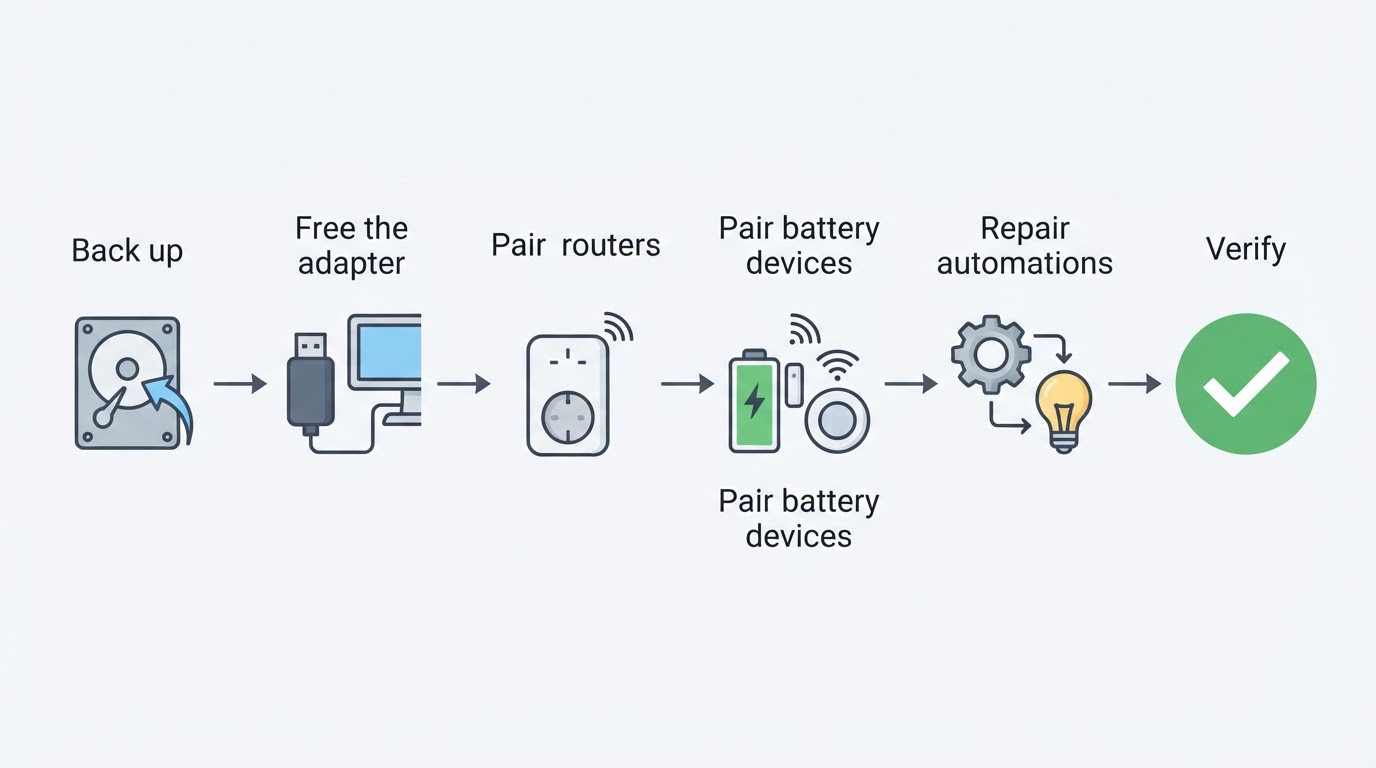
- Take a full Home Assistant backup before changing anything. This protects the Home Assistant configuration, but restoring it alone may not restore the old Zigbee network if you also overwrite the coordinator's network state.
- Save a manual ZHA network backup too. ZHA also creates automatic network backups; check its Network Settings and keep a copy outside the system. Returning to ZHA may require restoring the coordinator's network state using the adapter-specific ZHA procedure (Home Assistant ZHA documentation).
- Check compatibility and update deliberately. Confirm your coordinator is supported by Zigbee2MQTT and read its backup/restore instructions. If you need a Home Assistant or firmware update, back up first and validate the old setup before starting the migration.
- Inventory your devices. Record the device list with entity IDs, areas, and the automations that reference them. You will rename devices during pairing, and this list keeps the names consistent.
- Choose new network parameters. Generate a fresh
network_key, set a newpan_id, and choose a Zigbee channel after checking nearby 2.4 GHz Wi-Fi use. Channels 11, 15, 20, and 25 are commonly recommended starting points, not a guarantee of low interference (Zigbee network configuration). - Never point two integrations at one adapter. ZHA and Zigbee2MQTT cannot use the same serial adapter simultaneously. Disable or stop ZHA before Zigbee2MQTT starts; keep the old configuration and backups until you have verified the new setup.
The migration, step by step
- Free the adapter. Stop or disable ZHA without deleting its backup. Replug the coordinator if the serial port is still held open.
- Install Zigbee2MQTT with a fresh data directory. This is a new network, not a restored one, so do not copy an old database into it. Set the new
network_key,pan_id,channel, and serial port, then start. - Pair routers before battery devices. Open joining, factory reset one mains-powered device near the coordinator, and let its interview finish before moving on. The FAQ's guidance for adapter switches is to re-pair devices one by one; doing routers first rebuilds the mesh so distant battery devices can join through them.
- Rename as you go. Match each device's friendly name and entity ID to the inventory you made earlier.
- Repair the Home Assistant side. Fix broken entity references in dashboards, scripts, and automations. Renaming entities in the registry is usually faster than editing every automation.
- Verify, then stop. Confirm every device reports state, run the automations that matter most, and check link quality for anything flaky. The move is complete when every device from the inventory answers and each critical automation fires from a real trigger.
Decision matrix: does this move need re-pairing?
Scenario | Re-pairing needed? | Notes |
|---|---|---|
ZHA to Zigbee2MQTT | Yes, every device | Cross-implementation move; devices must be factory reset. |
Zigbee2MQTT adapter swap, same adapter type ( | Sometimes not | Depends on coordinator backup/restore compatibility and the exact adapters; follow the current Zigbee2MQTT migration instructions. |
CC2530/CC2531 (Z-Stack 1.2) to CC2652/CC1352 (Z-Stack 3) | Yes | Named as the exception even though the adapter family stays |
| Maybe | Not officially supported; check every device and re-pair the ones that fail. |
Changing | Yes, all devices | Both invalidate the old network credentials. |
Changing the Zigbee | Some devices | Supported for |
Updating Zigbee2MQTT or coordinator firmware | No | The network itself is unchanged. |
Moving Zigbee2MQTT to another machine | No | Copy the |
Limitations to plan around
- Sleepy devices will be slow. Battery-powered sensors and switches may need to be woken and paired close to the coordinator, and some take several attempts.
- Some devices need an explicit factory reset. Hardware that was connected to another bridge first, such as certain Hue bulbs, will not simply appear. Home Assistant's ZHA documentation stresses that removing it from the old bridge is not enough and a factory reset is required.
- Channel changes are not instant for everyone. Asleep end devices switch only when they wake, so trigger them after a channel change.
- Keep the coordinator clear of interference. Use a USB extension cable, prefer a USB 2.0 port or a powered hub, and keep the adapter away from USB 3.0 devices and the Wi-Fi router.
- Rollback needs more than one backup. Keep the Home Assistant configuration backup and the ZHA network backup. If the coordinator has been reconfigured, returning to ZHA may require restoring its network state; check your adapter's documented recovery path before starting.
Three quick questions
Can I migrate from ZHA to Zigbee2MQTT without re-pairing? No. The Zigbee2MQTT FAQ says devices previously connected to another Zigbee implementation must be factory reset before they can join, and its adapter backup and restore path is limited to adapters already running under Zigbee2MQTT.
Does ZHA's "migrate to a new adapter" feature help here? No. That feature moves a network between adapters inside ZHA, and its prerequisite is that the previous adapter was used in ZHA, not in deCONZ or Zigbee2MQTT. It is a recovery path, not a bridge to another integration.
Should I keep my old network key and channel? Generate a new network_key and pan_id, because this move re-pairs every device anyway and changing either value later would force a second re-pairing session. Choose the channel once, at the start.