The short answer
If you are starting from nothing and you want the largest choice of inexpensive sensors, plugs, bulbs, and buttons, build on Zigbee. Devices are plentiful, the same 2.4 GHz hardware is sold worldwide, and Home Assistant speaks the protocol without extra services.
If you are automating a larger or older building, your 2.4 GHz airspace is already busy, or you would rather pay more per device than spend evenings chasing interference, Z-Wave is the calmer choice. It has a smaller catalog at higher prices, and it solves a specific class of problem very well.
Both are mesh protocols. Both are local: the radio link does not depend on a cloud service, and both are supported natively in Home Assistant. Neither is a mistake. They simply fail in different ways, and that difference is the real subject of this decision.
The questions that decide it
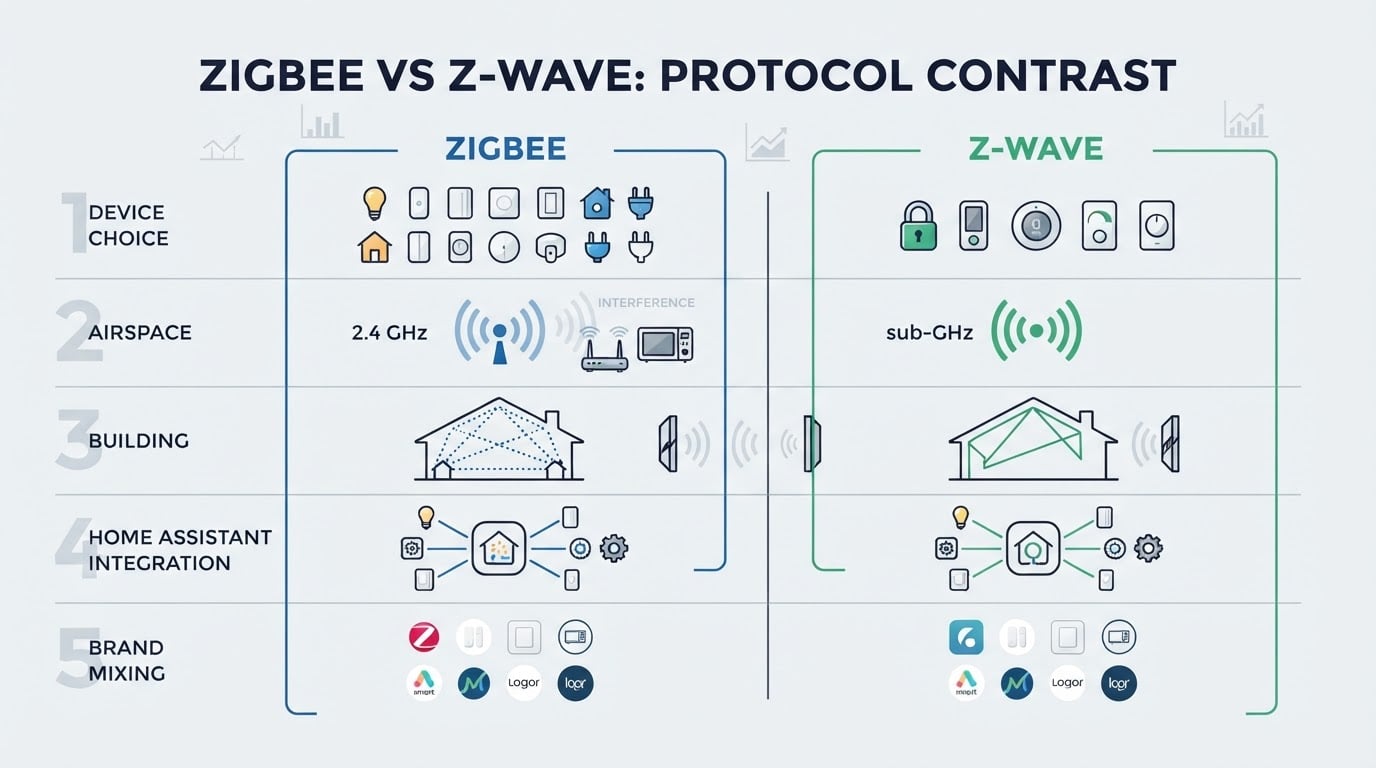
Strip away the spec sheets and the choice comes down to four practical questions.
Question | Zigbee | Z-Wave |
|---|---|---|
How much device choice do you get? | Very large: sensors, plugs, bulbs, buttons, and cheap modules from many vendors | Smaller but well stocked: strong on locks, contacts, thermostats, and wall switches |
How crowded is your airspace? | Shares 2.4 GHz with Wi-Fi, Bluetooth, and USB 3.0 noise | Runs on sub-1 GHz frequencies, which are quieter |
Will the signal survive your building? | Mesh routing helps; 2.4 GHz copes less well with thick masonry and foil-backed insulation | Mesh routing too, and lower frequencies generally pass through floors and walls more predictably |
How does it reach Home Assistant? | ZHA is built in; Zigbee2MQTT adds deeper device support | Z-Wave JS is the standard integration |
How predictable is mixing brands? | Modern Zigbee 3.0 devices generally work together; older gear can be fussy | Devices are certified, so mixing brands is usually uneventful |
One more consideration catches people out in Europe and other non-US markets: Z-Wave radios are built for the region they are sold in, so hardware bought for the wrong region will not join your network. Zigbee hardware on 2.4 GHz does not have that problem. If you are buying Z-Wave, buy in-region stock, and check that before you start comparing prices.
Reliability and interference
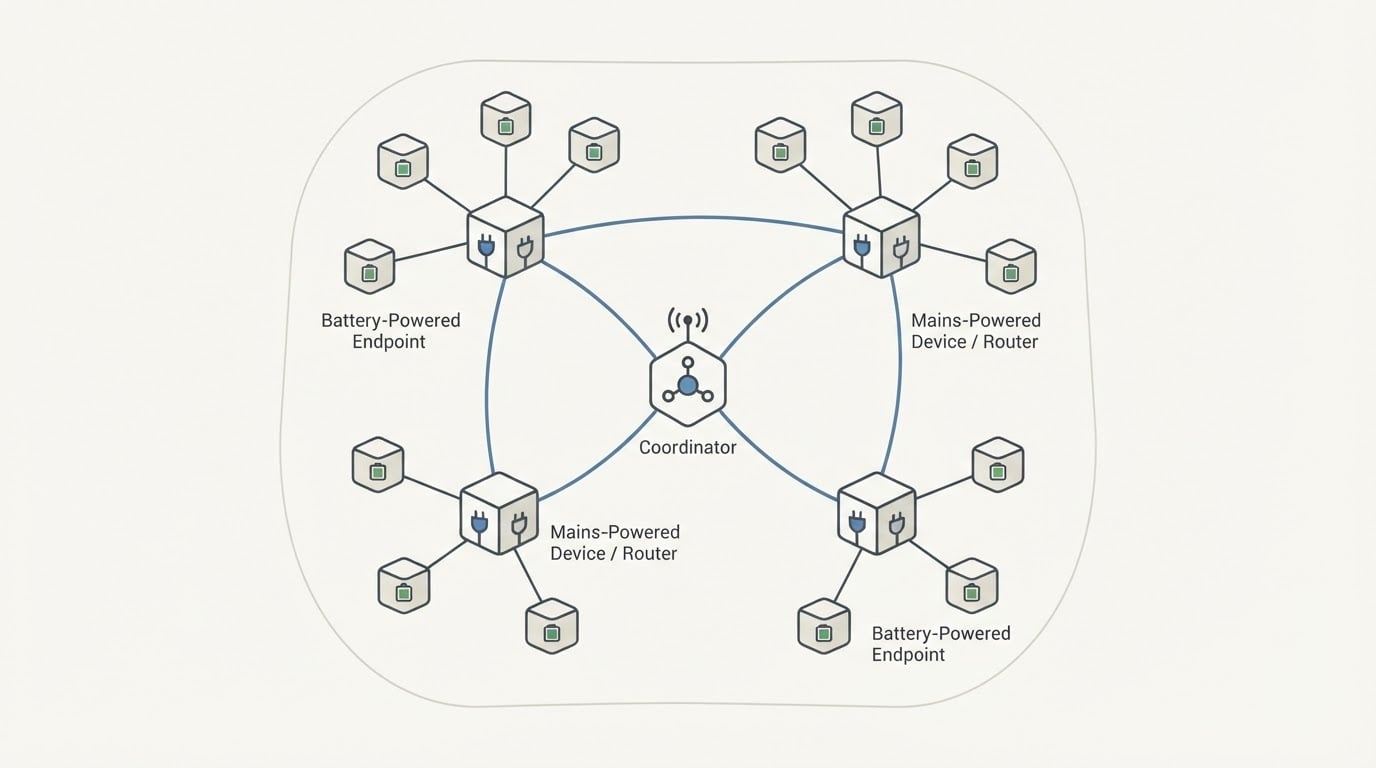
Both protocols form a mesh. Mains-powered devices, such as plugs, switches, and bulbs that stay powered, forward traffic for their neighbors. Battery-powered devices are endpoints: they talk to the mesh but do not relay it. That single sentence explains most unstable-network complaints, because a house full of battery sensors with two routers has a fragile spine no matter which protocol is printed on the box.
The usual culprit is placement, not the protocol. A coordinator plugged directly into a USB 3.0 port on a small server or single-board computer competes with the drive and the bus beside it, and it is often tucked behind the same furniture as the router. Move it onto a short USB extension cable, and move it away from the router, the drive, and the metal case. This is the cheapest reliability upgrade available, and it costs one cable.
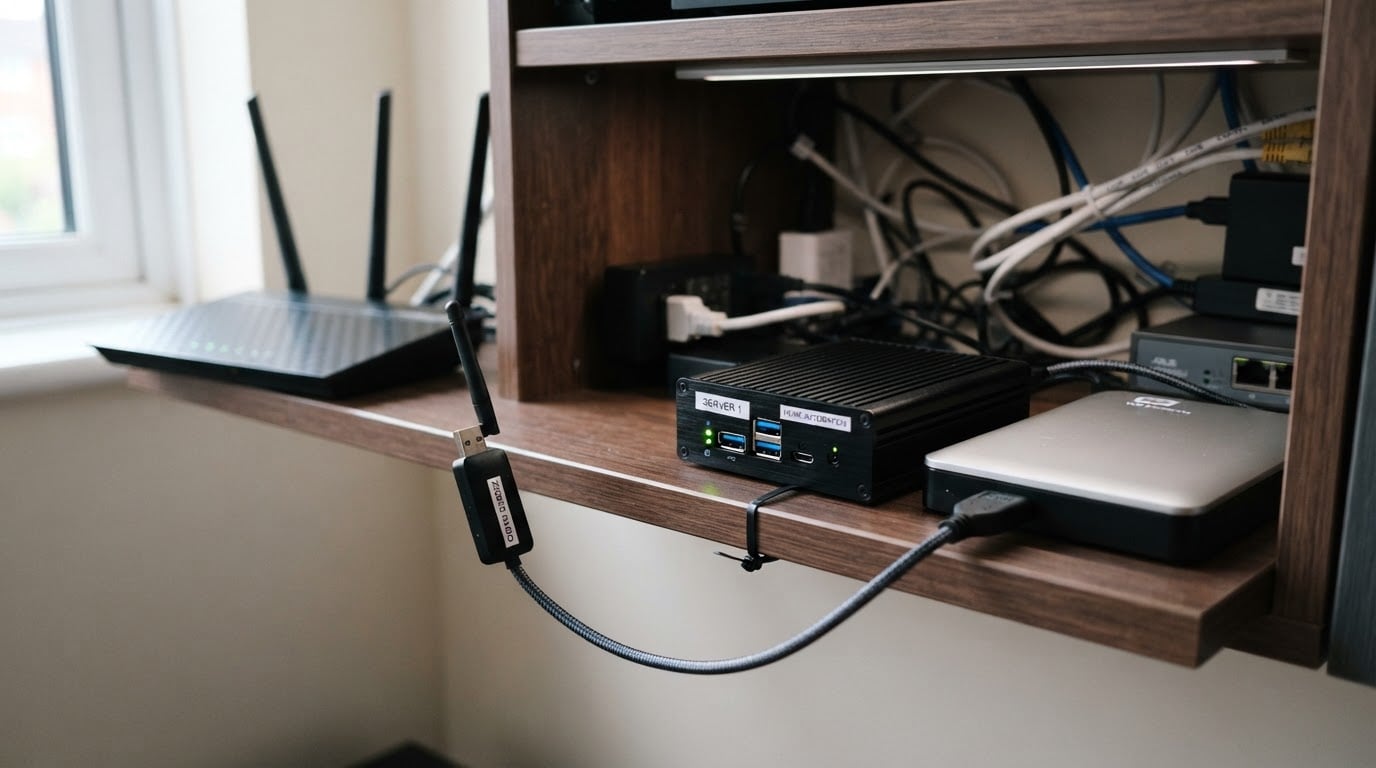
Wi-Fi coexistence matters on Zigbee because both live in 2.4 GHz. You cannot remove your access points, but you can keep them on Wi-Fi channels that do not sit on top of the Zigbee channel, and you can give the mesh a strong router in every area where you have sensors. Z-Wave trades that problem for different housekeeping: region-specific hardware that cannot be mixed, and a smaller pool of budget devices.
If a spot is dead, a mains-powered device in that spot fixes it in both worlds. Battery repeaters do not exist in either protocol, which is why the router plan matters more than the protocol label.
The stack matters as much as the protocol
Zigbee is not one piece of software. In Home Assistant you choose ZHA, which is built in and simple, or Zigbee2MQTT, which runs alongside Home Assistant, connects through a broker, and supports a broader set of devices and quirks. Neither is more correct; the difference is how much device support you need and how much extra service you are willing to run.
Z-Wave runs through Z-Wave JS. You can attach a USB stick directly to your host or use a network-attached coordinator, and that second option is worth considering for both protocols when the server lives in a cupboard, garage, or basement away from the middle of the house.
The practical instruction is to check the driver's device support before you commit to a device class, not after. If a buying guide for your region lists the model with a supported stack, you are safe. If it does not, treat the model as unverified no matter how good the radio looks on paper. The protocol sets your ceiling; the stack decides whether a specific device works at all.
Where each protocol fits
- A first smart home in an apartment or small house, with many small sensors. Zigbee. The catalog is deepest and cheapest, and a small footprint needs fewer routers to stay stable.
- A large detached house, thick masonry, or a busy 2.4 GHz environment. Z-Wave. The quieter band and better wall penetration make the most difference here.
- Locks, door contacts, and security devices. Check the regional catalog first. Both protocols carry them, and Z-Wave locks are well represented in some markets while Zigbee models dominate in others.
- Lighting, remotes, and buttons. Mostly Zigbee, because the cheap end of that market is overwhelmingly Zigbee.
- A house you plan to keep for a decade. Whichever protocol you can buy consistently in your region for the devices you will actually add.
- Best of both. Run two coordinators. Home Assistant handles both, each protocol becomes its own network, and the cost is maintaining two meshes instead of one.
How to choose before you buy the first device
Work through this in order. It takes about an hour, and it prevents the most expensive mistake in smart home building: buying devices for a protocol you will later abandon.
- List what you will automate over the next two years, not just this week. A protocol choice is a commitment, because devices cannot switch sides.
- Check in-region stock and prices for those exact device classes. A protocol with no local supply is a theoretical option, not a real one.
- Find where the coordinator can live. Central, elevated, away from the router and the disks, and reachable by cable or a network link.
- Judge your 2.4 GHz congestion honestly. Count your own access points, the neighbors you can see, and the USB 3 devices near your server. If that picture is crowded and you do not want to manage it, that is a vote for Z-Wave.
- Confirm Home Assistant support for the specific models, including which integration covers them, before you buy.
- Plan one mains-powered router in every area where battery devices will live. Both protocols need this, and it is the most commonly missing piece.
Your decision is ready when you can name the coordinator, the integration stack, the first ten device models, and where the routers go. If any of those is still vague, the protocol question is not really answered yet. It has only been postponed.
Common questions
Can Home Assistant run Zigbee and Z-Wave at the same time? Yes. Two radios, two networks, one dashboard. The coordination cost is real but small, and it is the standard answer for a home that wants Z-Wave locks next to a large set of cheap Zigbee sensors.
Do I need a vendor hub? No. A coordinator radio plus Home Assistant is enough, and it is the configuration that keeps control local. Vendor hubs can be convenient, but they can also put a cloud service between you and your own devices.
Which protocol is better for battery devices? Both carry them, and on both, battery devices are endpoints that do not strengthen the mesh. Battery life is dominated by device firmware and how often a device reports, so compare the specific model rather than the protocol.
Is Z-Wave worth the higher price? Only when it solves a problem you actually have: interference you are tired of managing, a building that eats 2.4 GHz, or a device class you can only buy locally in Z-Wave. If your constraint is budget and breadth of choice, Zigbee wins.
The bottom line
Pick the protocol you can buy consistently in your region for the devices you actually plan to use, then spend your effort on the coordinator's placement and a couple of good routers. Zigbee is usually the cheaper, broader starting point; Z-Wave is the calmer radio for difficult buildings. Switching later means re-pairing everything, so treat this as a commitment rather than a preference.