What actually differs between Zigbee and Thread
Both protocols ride the same radio: IEEE 802.15.4, in the crowded 2.4 GHz band, at 250 kbps. Up to that point they are near-twins — low-power mesh networks built for battery devices that speak in short bursts. The difference starts one layer above the radio, and that is what decides how your home network behaves.
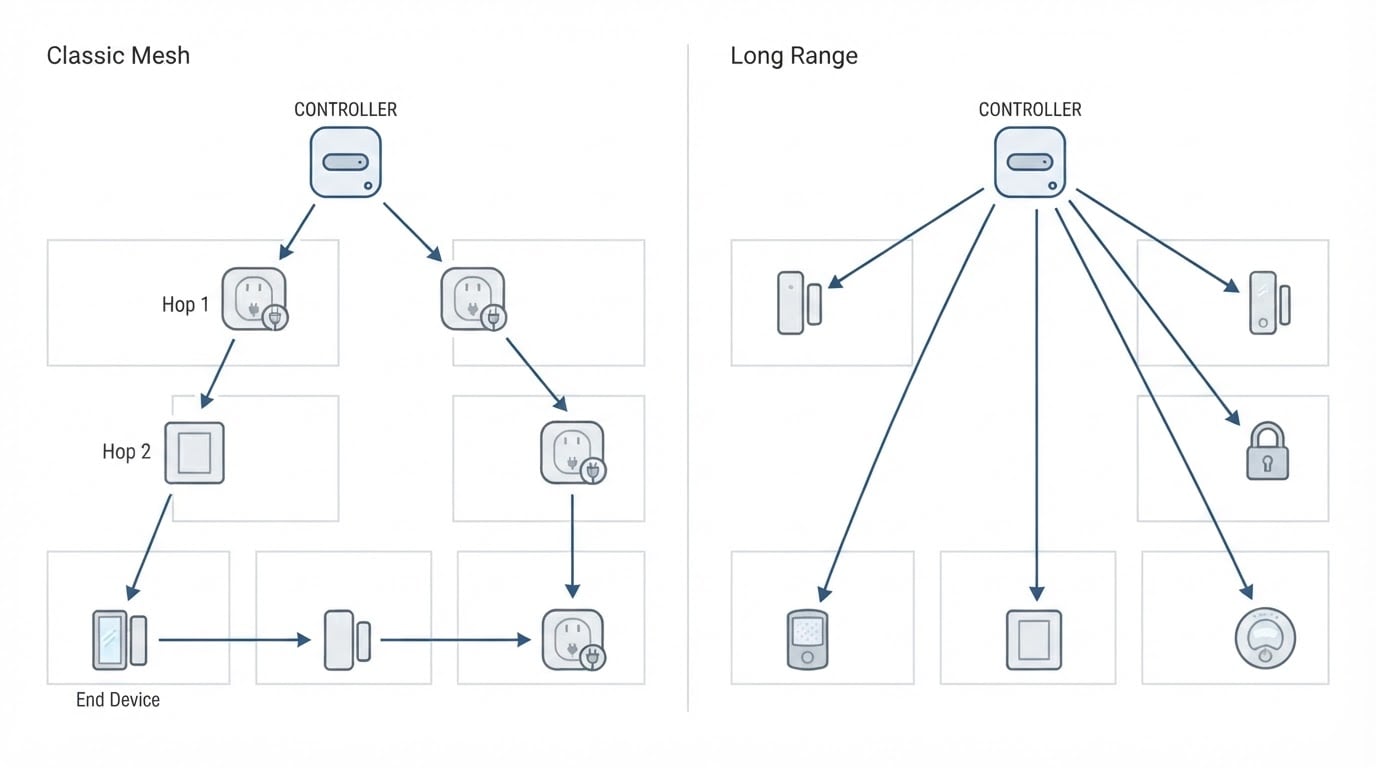
Zigbee is a complete stack. It defines its own network layer and its own application layer, so a device does not join "the internet"; it joins a Zigbee network run by a coordinator — usually a USB stick, a networked gateway or a hub. In Home Assistant that coordinator is normally driven by ZHA or Zigbee2MQTT. Mains-powered Zigbee devices repeat the signal for their neighbours, which is why a couple of well-placed smart plugs often rescue a weak mesh.
Thread is an IPv6 mesh. Mains-powered Thread devices can route packets for the mesh, and a border router connects the whole thing to your regular network. After that, a Thread device is addressed like any other IP host, which is exactly why platform vendors like it. Most consumer Thread devices you will meet are also Matter devices, and Matter is the application layer Home Assistant actually speaks to; Matter can equally run over Wi-Fi or Ethernet. A "Matter" label therefore does not guarantee Thread, and a Thread device without Matter is usually not something Home Assistant can talk to. Zigbee is not a Matter transport at all.
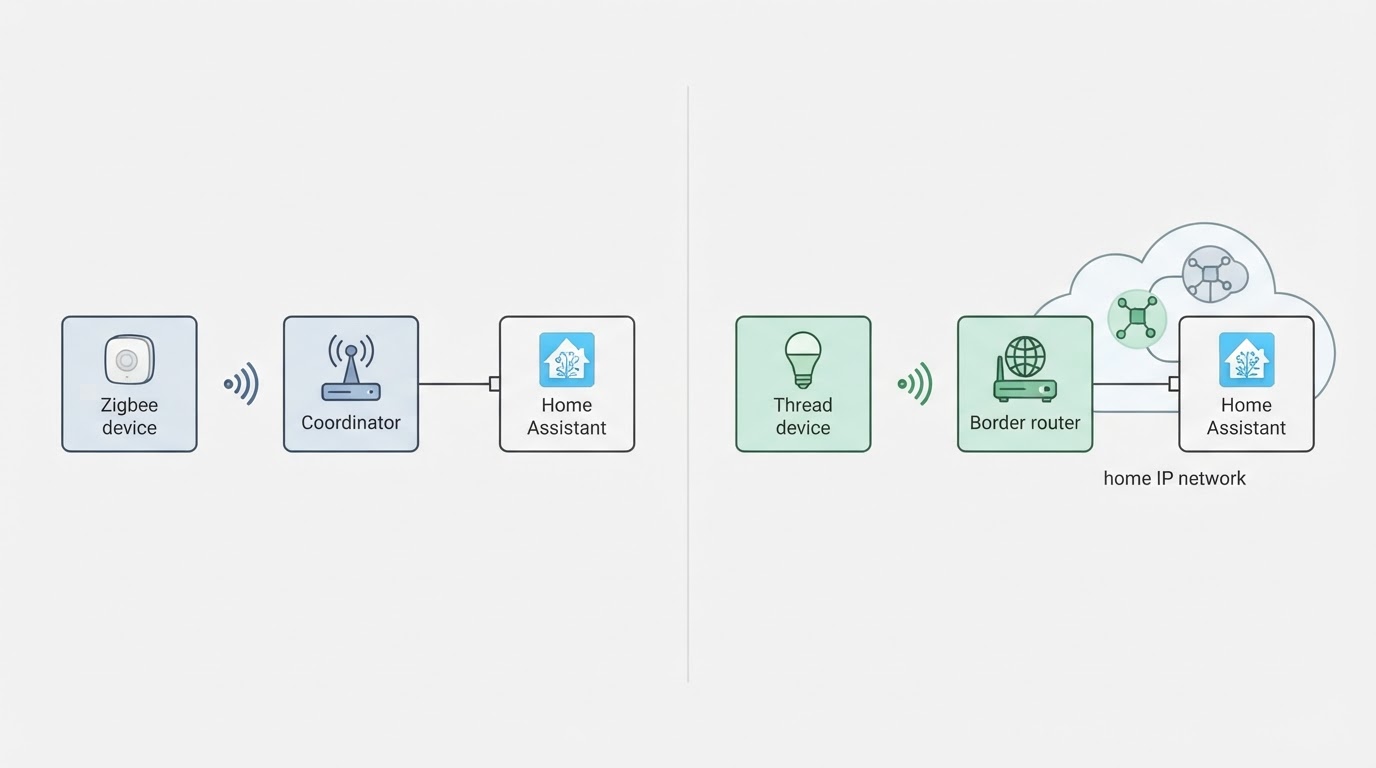
Two consequences matter more than any feature list. First, a Zigbee network lives inside one coordinator and one driver family, while a Thread network lives on the same IP network as your server, phones and laptops. Second, both protocols share the 2.4 GHz air with your Wi-Fi — and with each other when you leave them on overlapping channels.
Step 1: Count the radios, hubs and devices you already own
Start with what is already in the house. Open Home Assistant, walk through Settings → Devices & services, and then look at the physical shelf.
- Which coordinators or hubs exist? A Zigbee USB stick, a hub from an old starter kit, a border router built into a speaker or TV box, or nothing at all.
- Which devices belong to which radio? A device paired through a vendor app may be Zigbee, Thread, Wi-Fi or something proprietary; the box or the app usually says which.
- How many devices are mains-powered? Mains-powered units are the ones that strengthen a mesh. Battery sensors mostly just listen.
Checkpoint: one page with two columns, "Zigbee" and "Thread", and everything you own listed under the radio it actually uses. If a device only works inside its vendor's app, mark it as unavailable for your own network — that limitation is worth seeing in writing before you plan around it.
Step 2: Prove that Home Assistant can reach each option
Before spending anything, test the software side.
- For Zigbee, add or inspect the ZHA or Zigbee2MQTT integration and confirm it sees your coordinator. ZHA is the built-in path; Zigbee2MQTT gives you more device-level control and its own dashboard, at the cost of one more service to keep running.
- For Thread, the Thread integration manages the mesh while Matter handles devices. If you already own a border router, check whether it can share its network credentials with Home Assistant. Some ecosystems can and some cannot, and that single detail decides whether the speaker in the living room saves you a purchase or only looks compatible on paper.
- Pair one device of each type you plan to keep, and confirm one complete action: a button press, a sensor reading, a light that responds.
Checkpoint: one working device per protocol, controllable from your own dashboard. If you own no radio at all, the entry cost is a single coordinator or border router; everything past that point is free software.
Step 3: Compare the device lists you can actually buy
A protocol is only as good as the hardware you can put on it, so make your next five purchases the test.
- List the five devices you actually want next: a door sensor, a bulb, a plug, a radiator valve, a blind motor, whatever is next on the list.
- For each one, note whether a Zigbee version and a Thread version exist from a shop you can order from, at a price you would pay. Availability changes by country, so check your local listings rather than reviews written for another market.
- Note which option needs an extra step. A Thread device usually has to be Matter-certified before it appears in Home Assistant, while a Zigbee device sometimes needs a particular coordinator chipset or driver family before every feature works.
- Mark each row honestly: both options exist, only Zigbee, or only Thread.
Checkpoint: a five-row table. If two or more of your next five devices have no Thread option you would accept, Thread is not the honest answer this year — however good its architecture looks. If Thread covers all five and you like IP-based networks, your existing Zigbee fleet can stay exactly as it is.
Step 4: Test the 2.4 GHz air before you commit
Both protocols share the band with Wi-Fi, and this is where a real home beats a spec sheet.
- Scan first. A free Wi-Fi analyser app on your phone shows which 2.4 GHz channel your access point uses. Keep your Zigbee or Thread network clear of it: both protocols use channels 11 to 26, and only some of those sit away from a busy Wi-Fi channel.
- Move the radio. Put the coordinator or border router on a short USB 2.0 extension cable, away from the server, its USB 3.0 ports and any metal enclosure. Interference is usually a placement problem before it is a hardware problem.
- Scale slowly. Join three devices in three different rooms, including the room where reception will be worst, and let them run for a week before buying the other twenty-seven.
Checkpoint: three devices that answer every day from the far rooms, with no dropouts. Known limitation: a mesh heals slowly, so one weak spot may need a mains-powered repeater — a smart plug in the right place usually does more for the network than a stronger radio does.
Step 5: Score both options and write the decision down
Score both protocols on the same five criteria from 1 to 5, then weight the two that matter most in your house:
- Hardware you already own and can reuse.
- Devices you can buy for your next five purchases.
- How you want to run the network: one coordinator to maintain, or an IP network your other systems already understand.
- Interference and maintenance risk where the network will actually live.
- How hard it would be to undo the choice later.
Add the weighted scores and write one line underneath: "Zigbee for now, revisit if Thread device availability changes" — or the opposite. Keep the sheet.
Checkpoint: a decision you can defend in one sentence, plus the condition that would change it. If the two scores land within a point of each other, running both protocols is a legitimate answer: they can coexist on separate channels as long as you plan the air.
Which way the answer usually falls
- A large working Zigbee network: stay. Rebuilding it buys you architecture, not functionality.
- A new setup with a modern hub already in the house: check whether that hub can share its Thread network, then lean Thread and add Matter devices as you go.
- A mixed house: run both. Zigbee for the cheap sensors and lights, Thread for the devices you want on IP, with the channels kept apart.
- Renters who move often: pick the protocol whose coordinator or border router you can pack and take with you.
The mistakes that make people pick wrong
- Treating Thread and Matter as one thing. Matter is the language; Thread is only one of the roads it travels on.
- Believing a Zigbee house and a Thread house cannot share a home. They can, with channel planning and two radios.
- Choosing from published figures instead of your own rooms. Walls, mirrors and a rack full of metal beat any data sheet.
- Buying thirty devices before testing three.
Where a tested comparison can save you an evening
Disclosure: this guide is published by ConnectedCasa, an independent smart home publication, so treat the cross-check below as the publisher's own work rather than a neutral third-party review.
ConnectedCasa product interface.
None of the five steps above needs paid software, and you can finish the whole comparison with your phone, your own hardware and a free evening. If you would rather cross-check your notes against work that has already been done on a live network, ConnectedCasa describes its protocol comparisons as tested side by side on one live network rather than compared from spec sheets, with the decision framed on four criteria: reliability, range, device choice and Home Assistant compatibility. Use it the way you would use any second opinion: keep it only if it agrees with the devices you can actually buy.