The "hub" is three separate things
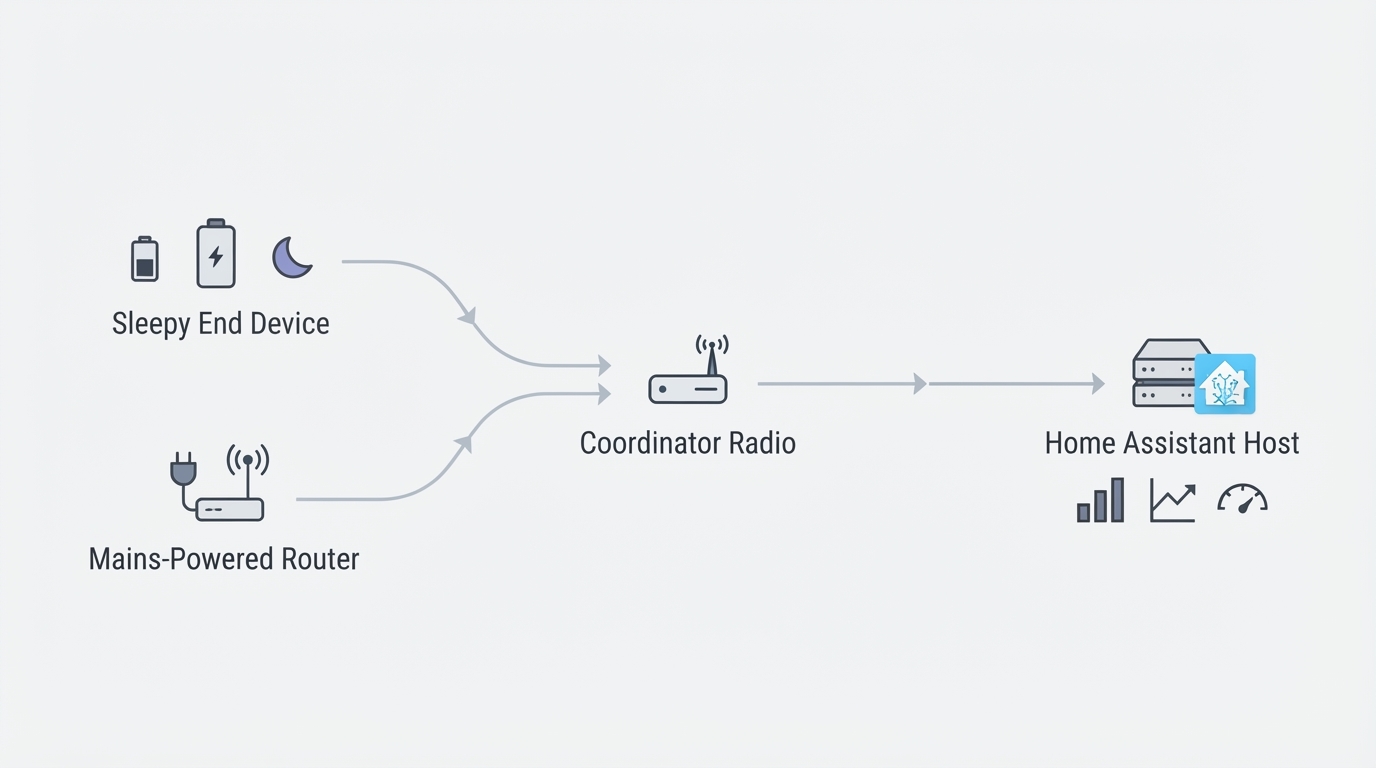
Buyers usually picture a Z-Wave hub as one box with a logo on the front. In a Home Assistant system that box splits into parts you choose independently, and each part fails in its own way.
The radio controller. Usually a USB stick, occasionally a network-attached gateway. It stores the network's identity, the node list, and the security keys. Every device you pair belongs to this controller and to nothing else.
The driver. Home Assistant does not speak Z-Wave directly. The Z-Wave JS driver talks to the radio, interviews each device, tracks its capabilities, and exposes it as entities. It runs as its own process, either as a Home Assistant add-on or as a standalone service on another machine.
Home Assistant itself. Automations, dashboards, history, and the entity layer you actually touch. It is a client of the driver and never talks to the radio on its own.
That separation explains most Z-Wave troubleshooting. If the driver stops, every Z-Wave entity goes unavailable even though the stick is fine. If the stick is lost, wiped, or replaced, a Home Assistant backup will not restore the pairing — the network lives in the controller's own memory.
How the pieces fit together
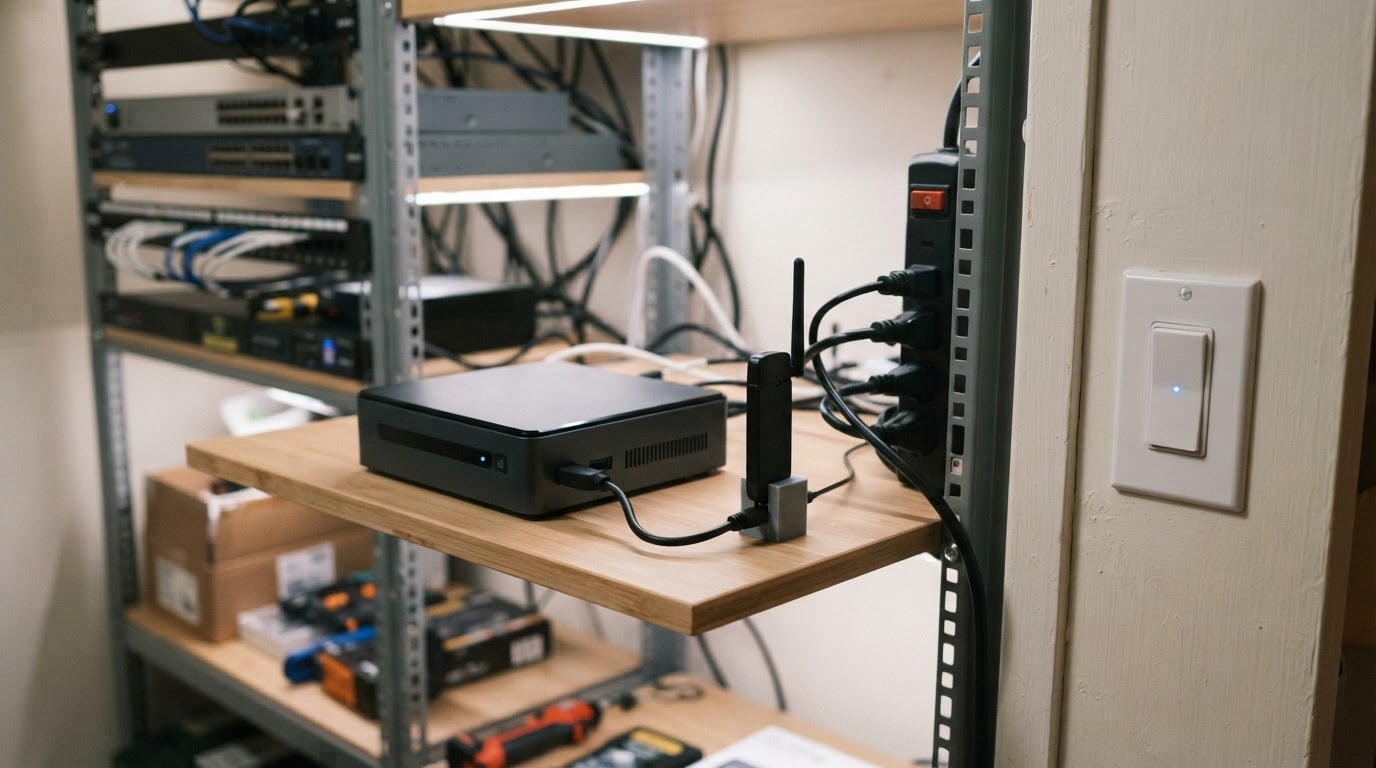
The radio does not have to sit in the same machine that runs Home Assistant.
The chain is short: Home Assistant connects over a WebSocket to a Z-Wave JS server, that server owns the USB controller, and the controller talks to the mesh of devices. The server and the controller can live on the same box as Home Assistant, or on a small always-on computer parked wherever the radio gets the best coverage.
Three deployment shapes cover almost every home setup:
- All-in-one. Home Assistant OS with the official Z-Wave JS add-on. Fewest moving parts, one update cycle, one backup story. The catch is that the radio ends up wherever your server lives, which is often a rack, a closet, or a basement.
- Add-on with a control panel. The community Z-Wave JS UI add-on runs the same driver, wrapped with a network map, device statistics, firmware update tools, and NVM backup and restore. It is the quickest way to see what your mesh is doing without adding a second machine.
- Split deployment. A Z-Wave JS server on its own always-on device near the middle of the house, with Home Assistant pointed at its host and port. Radio placement improves a lot; you add one more dependency that can take the whole network offline when it reboots.
There is no universally right answer here. If your server already sits central and quiet, the add-on is enough. If it lives in a metal rack in a corner, moving the radio is usually cheaper than adding repeaters.
Z-Wave vs Zigbee vs Thread
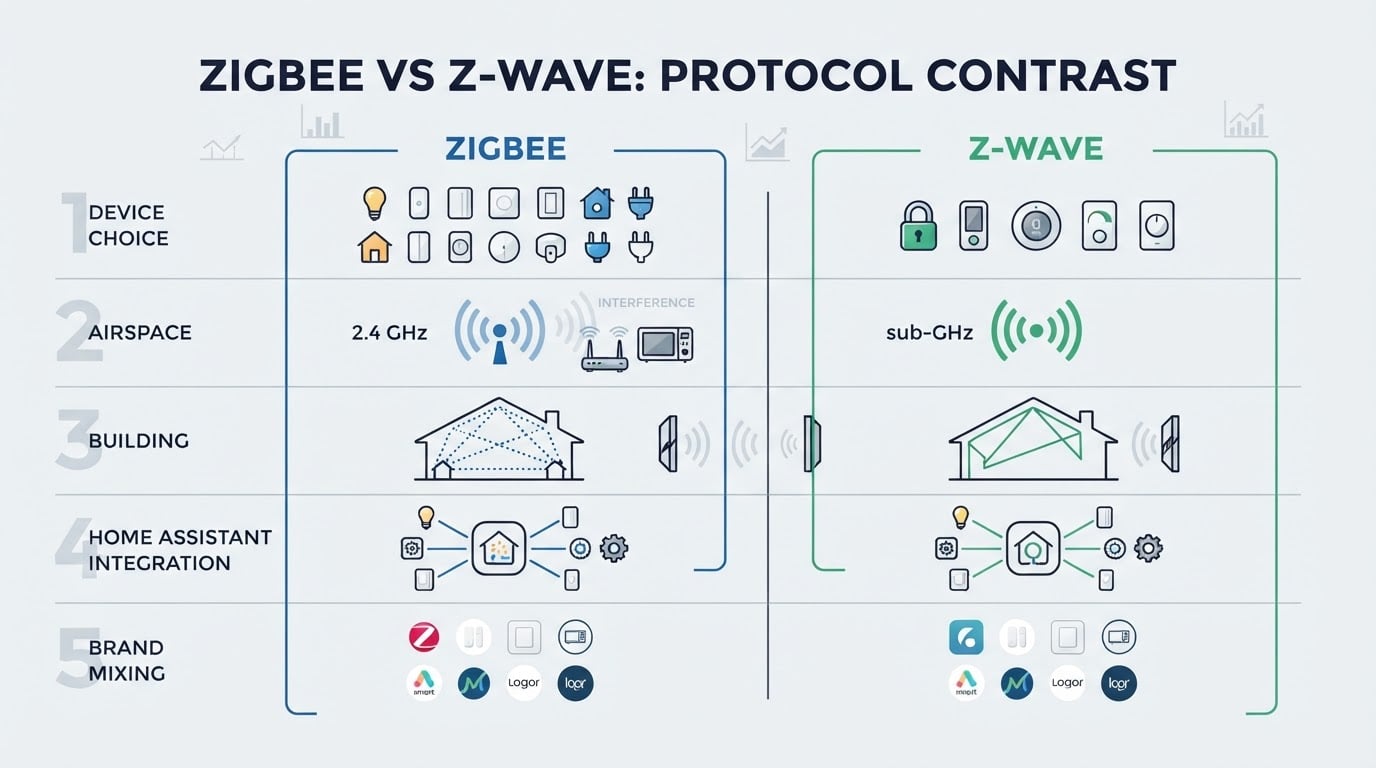
The three protocols solve the same problem with different trade-offs. For a Home Assistant user, the differences that matter are the band, the topology, and what happens when the controller dies.
| Z-Wave | Zigbee | Thread |
|---|---|---|---|
Radio band | Sub-GHz, region-specific (around 868 MHz in Europe, around 908 MHz in the US) | 2.4 GHz worldwide | 2.4 GHz worldwide |
Network model | Controller-managed mesh with a home ID and node IDs; classic mesh allows up to four hops | Coordinator-managed mesh with a PAN ID | IP-based mesh served by one or more border routers |
Pairing and security | Inclusion from the controller, with S2 and a device PIN for authenticated device classes | Pairing through the coordinator, install codes for Zigbee 3.0 | Commissioning through a border router and a Matter ecosystem |
Repeaters | Mains-powered devices repeat; battery devices sleep and do not | Mains-powered devices repeat; battery devices generally do not | Mains-powered Thread devices route for the mesh |
In Home Assistant | Z-Wave JS driver, optionally with Z-Wave JS UI | ZHA or Zigbee2MQTT | Thread border router plus the Thread and Matter integrations |
Watch out for | Region-locked hardware and controller-dependent backups | A crowded 2.4 GHz band and coordinator quality | A smaller device pool and border router placement |
The band is the part people underestimate. Z-Wave occupies a licensed sub-GHz slice, so it does not compete with Wi-Fi, and it is not affected by the 2.4 GHz congestion that Zigbee and Thread share with access points, microwaves, and USB 3.0 noise. The price is bandwidth: Z-Wave is built for switches, sensors, and locks that send short commands, not for streaming anything.
Z-Wave's other selling point is certification. A certified device from one vendor is expected to work on a certified controller from another, which is why a Home Assistant user with a mixed pile of switches, sensors, and locks can put them all on one network without checking compatibility lists first.
What to check before you buy a controller
Region first. Z-Wave radios are built for a regional frequency band. A US-spec stick will not control European devices, and a European stick will not control US devices. Match the version to the devices you already own rather than the one that is cheapest to import.
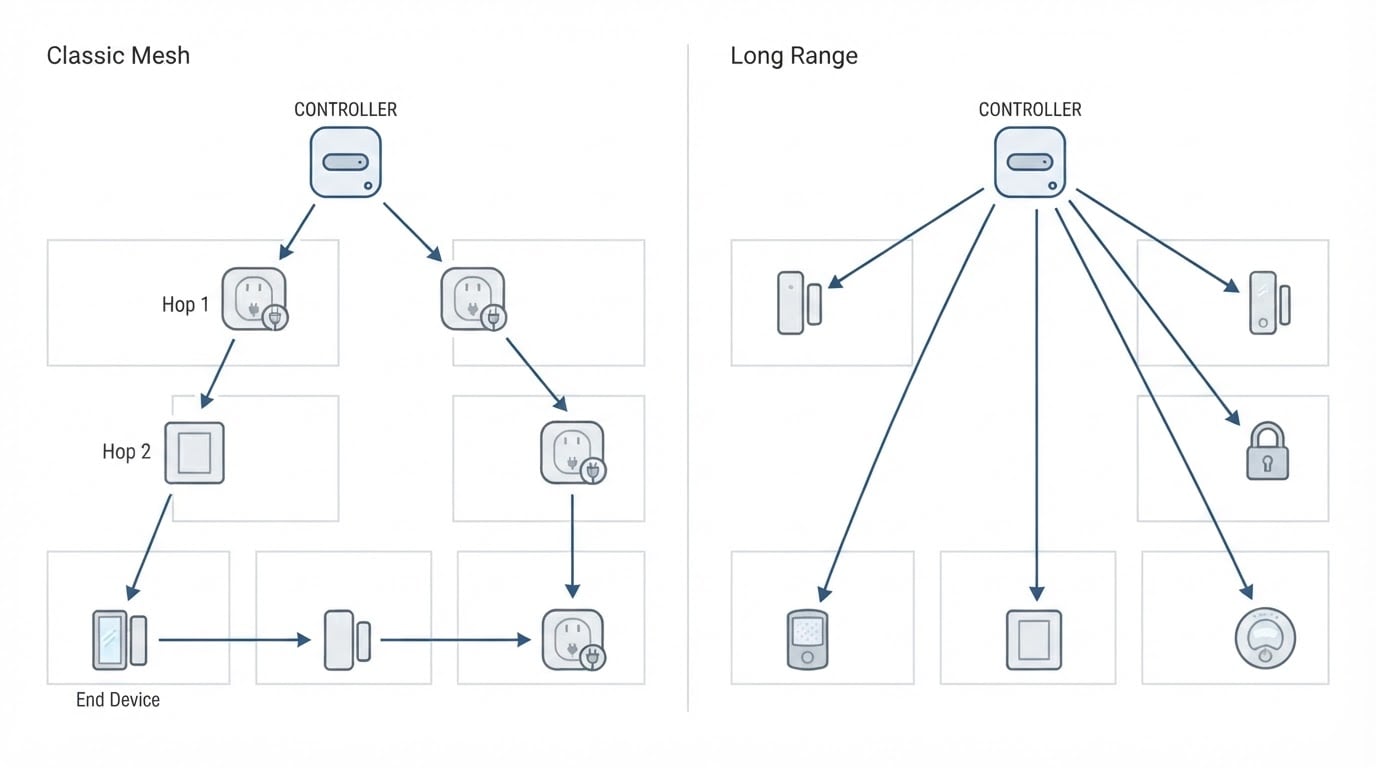
Series, for the right reasons. Controllers are usually described as 500, 700, or 800 series. Newer series add range and firmware refinements, and 800-series hardware is what Z-Wave Long Range requires. Classic mesh routing and Long Range are two different topologies, not a faster version of the same one, and Long Range support depends on your region and on the end devices themselves. Buy a current series for the support window; do not buy it expecting Long Range to transform the house.
Backup and migration. Ask one question before ordering: can this controller be backed up and restored at the firmware level? Many 700- and 800-series controllers can, and that is what lets you move an entire network onto a replacement stick without re-pairing every device. Coverage on older 500-series hardware is patchier. Test the backup while the network is healthy, not after a stick fails.
Driver support. The controller has to be supported by Z-Wave JS, and device support leans on a community-maintained configuration database. Confirm that the exact model is supported, especially with older or unusually cheap hardware that may only partially work.
Firmware track record. Early 700-series firmware had well-documented stability problems that later releases fixed. Whatever you buy, know how its firmware is updated, and update it before pairing the rest of the house.
Placement and repeaters. A short USB extension cable and a clear spot away from metal and power supplies do more for stability than an antenna upgrade. Mains-powered devices extend the mesh; battery sensors and remotes sleep most of the time and do not repeat anything. In a house with sparse mains-powered devices, add one before blaming the protocol.
Where Z-Wave setups go wrong
Treating a Home Assistant snapshot as a network backup. Snapshots capture the add-on and its configuration, not the controller's pairing table and keys. Without a firmware-level backup, a dead stick means re-including every device by hand.
Leaving devices on S0. S0 is the older security class, and it is chattier and weaker than S2. When you re-include a device, use S2 and scan the device PIN; network-wide inclusion with S2 also blocks accidental S0 enrollment.
Buying hardware across regions. Imported sticks and devices look identical and will not join each other. Check the band before you check the price.
Expecting the mesh to be instant or static. Routes are recalculated over hours and days as devices report in. A network that looks messy an hour after inclusion often settles on its own. Judge it the next day.
Assuming more hops equal more range. Classic Z-Wave mesh stops at four hops, and every hop adds latency and another failure point. A mains-powered repeater placed between the controller and a dead zone beats hoping a distant device finds its way around.
Replacing a vendor hub without a plan. Pairing lives in the controller, so moving from a consumer hub to Home Assistant means re-including every device in place. Label devices and budget a weekend before you start.
A pre-purchase checklist
- Controller matches your region's frequency band.
- Current series (700 or 800) with firmware you can update.
- Confirmed support in Z-Wave JS for the exact model.
- Firmware-level backup tested at least once.
- Radio planned for a central, clear spot, not inside a metal rack.
- At least a few mains-powered devices to repeat for the mesh.
- New devices included with S2 and their PINs.
- Snapshot and firmware backup stored somewhere other than the server.
When Z-Wave is the wrong choice
If you are starting from nothing and want the widest selection of inexpensive sensors, Zigbee will usually get you further for less money. If you are buying Matter devices and want IP-native networking, Thread is the one to watch. Z-Wave holds its ground for locks, security sensors, and any home where the 2.4 GHz band is already crowded.
Choose by the devices you can actually buy locally and the repeaters you can keep powered. The protocol on the box matters far less than the network you can maintain.