Why the two stacks cannot share one coordinator
ZHA and Zigbee2MQTT are independent Zigbee implementations, and each expects to own the radio it talks to. Home Assistant's ZHA documentation requires a "single dedicated Zigbee coordinator with a single Zigbee network," with that coordinator not used by any other application. Zigbee2MQTT's FAQ says the same from its side: "each Zigbee2MQTT installation instance only supports connecting a single dedicated Zigbee Coordinator radio adapter or module with a single Zigbee network" (FAQ | Zigbee2MQTT).
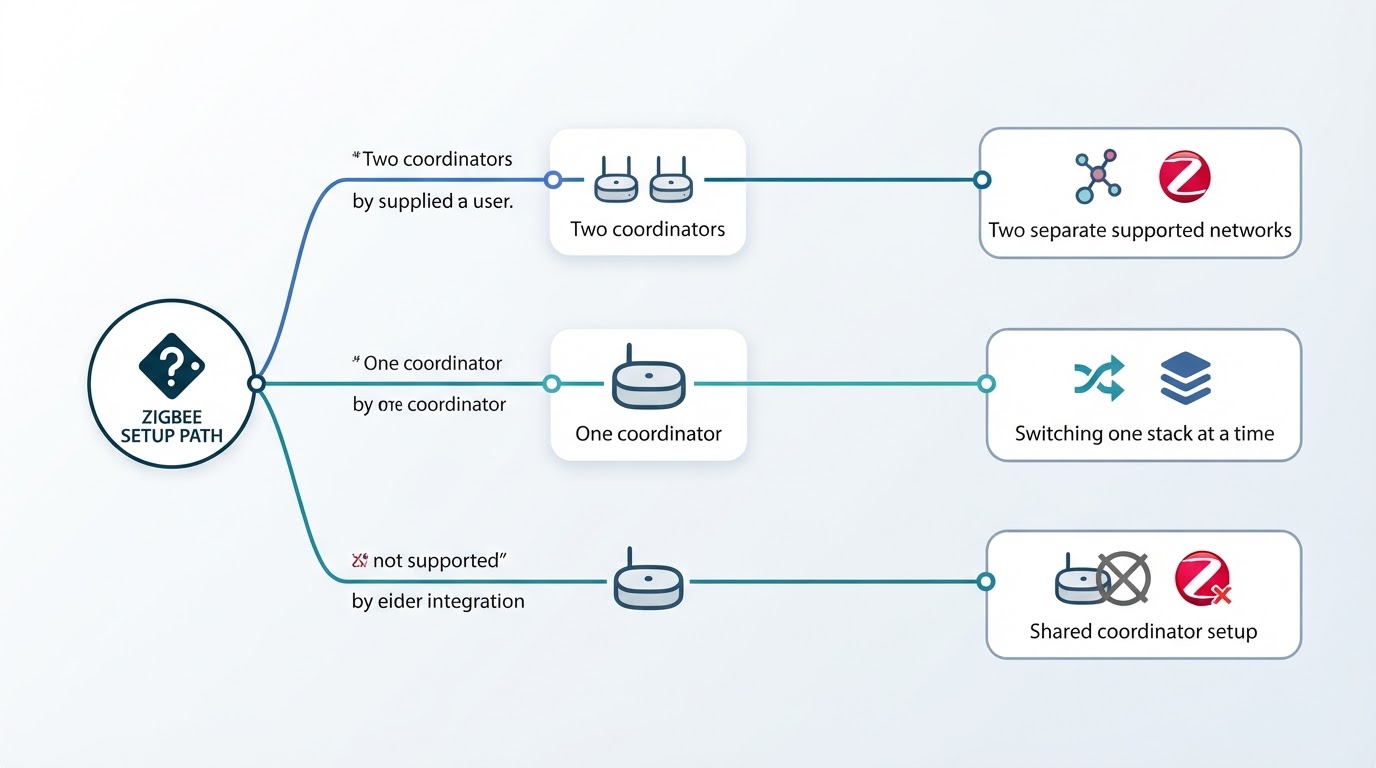
The supported pattern is therefore two coordinators, one per stack, each with its own Zigbee network, both connected to the same Home Assistant. Routers on one mesh do not carry traffic for the other, and each mesh depends on its own coordinator.
The second rule matters just as much: a Zigbee device can belong to only one network at a time. Home Assistant calls this "a limitation in the Zigbee protocol specifications, governed by the CSA (Connectivity Standards Alliance)," applying to every Zigbee implementation (Zigbee Home Automation), and Zigbee2MQTT adds that moving a device to another network requires a factory reset and a fresh pairing (FAQ | Zigbee2MQTT). Running both at the same time never means one device answering to both integrations; it means two networks that coexist.
Decision table: which plan do you actually have?
Plan | What happens in Home Assistant | Verdict |
|---|---|---|
Two coordinators, one for ZHA and one for Zigbee2MQTT | Two independent Zigbee networks, each managed by its own integration | Supported; the only pattern both projects describe as normal |
One coordinator, one integration active at a time | The radio is used by whichever stack currently holds it; switching means stopping the other | Works as switching, not parallel operation |
One coordinator shared by both at the same time | Both stacks talk to the same radio, which both projects expect to be dedicated | Not supported; shared-coordinator setups are experimental |
One device on both networks | The device cannot join two coordinators at once | Not possible without re-pairing |
Some network-attached coordinators accept several client connections, which is where shared-coordinator experiments come from, but neither integration documents that as supported.
Before you add the second coordinator
- A second, dedicated coordinator. Zigbee2MQTT supports USB, GPIO, or network adapters, recommends zStack and EmberZNet, and needs a host with an MQTT broker such as Mosquitto (Getting started | Zigbee2MQTT). It cannot be a radio ZHA is already using.
- A channel plan. Keep the two networks on different channels. Zigbee2MQTT advises a different
base_topicandchannelfor multiple instances, and Home Assistant recommends channels 15, 20, and 25 (FAQ | Zigbee2MQTT, Zigbee Home Automation). On ZHA, the channel is the only field you can edit in network information; leave a working network alone unless you have a reason. - Placement and connection quality. Use a USB extension cable, keep the coordinator away from USB 3.0 ports and Wi-Fi gear, and give network adapters a stable serial connection; Home Assistant does not recommend Wi-Fi, WAN, or VPN for EmberZNet adapters (Getting started | Zigbee2MQTT, Zigbee Home Automation).
Prepare a move from ZHA to Zigbee2MQTT
If the second network is the first stage of a migration rather than a permanent split, treat it as a staged move.
- Inventory the devices. Note what each integration supports and the factory-reset procedure for every device you intend to move; that procedure is the real cost of the move.
- Decide the target settings, then leave them alone. Zigbee2MQTT requires re-pairing when the network key or PAN ID changes, and a channel change may require re-pairing some devices (FAQ | Zigbee2MQTT).
- Protect the current network first. ZHA performs automatic backups and can restore or migrate to a different coordinator without losing connected devices (Zigbee Home Automation); confirm that backup exists before you touch anything.
- Stage Zigbee2MQTT beside it. Give the new instance its own data directory and a unique
base_topic, keep the MQTT broker shared, and leave the ZHA radio untouched. - Move devices in small batches. Pair two or three, confirm they work in Home Assistant, then continue; rollback is another factory reset and re-pair for every device you moved.
- Finish with an observable check. Both integrations show their own coordinator, every device appears in exactly one of them, and you know which device you would roll back first.
Claims about going from ZHA to Zigbee2MQTT without re-pairing deserve a closer look. Zigbee2MQTT documents re-pair-free migrations only for adapter swaps with backup and restore support, currently zStack and Ember adapters, and calls switching between those families unsupported (FAQ | Zigbee2MQTT). A move from ZHA crosses implementations, and devices from another implementation must be factory reset before they can join (Zigbee Home Automation). Plan for re-pairing; treat a re-pair-free move as a bonus.
If you have not decided which stack should own the devices you are moving, compare their different setup and maintenance trade-offs in this site's Zigbee2MQTT vs ZHA guide before resetting anything.
Limitations to plan around
- The protocol limit is absolute. One device, one coordinator, one network, so both stacks coexist only while both coordinators stay healthy.
- Interference is the common practical failure. Two 2.4 GHz networks plus Wi-Fi share the band, so channel choice and placement are design work rather than tuning.
- Re-pairing is the hidden cost. A network key or PAN ID change forces it, and every device moved between networks needs a factory reset.
- Maintenance doubles. Two integrations mean two sets of entities, two places to debug a device, and dashboards that track which stack owns what.
- Device support differs per stack. Check each device before moving it; it still lives on exactly one network.
FAQ
Can ZHA and Zigbee2MQTT use the same coordinator at the same time?
No. Both projects document that a coordinator is dedicated to a single integration and cannot be used by another application. A network coordinator that accepts several client connections is a hardware special case, not a supported shared-network setup.
Do I have to re-pair my existing ZHA devices to add Zigbee2MQTT?
No. Leave the ZHA network as it is and pair only the devices you want on the new Zigbee2MQTT network. Adding a second coordinator does not disturb the first network; only moving a device between the two networks requires a factory reset.
Can I migrate ZHA to Zigbee2MQTT without re-pairing?
Treat re-pairing as the default. Zigbee2MQTT's re-pair-free path covers adapter swaps inside Zigbee2MQTT for supported adapter families, while devices coming from another implementation must be factory reset before they can join. Keep ZHA's automatic backup as the rollback and move a few devices at a time.