What a trigger id actually is in Home Assistant
A trigger id is a label you attach to one trigger inside an automation. Home Assistant's trigger documentation defines it as an optional id on any trigger: leave it out and the platform falls back to the trigger's position in the list, counting from zero. The label can be read from trigger conditions and from the actions, which is what makes a multi-trigger automation decidable — an action can be tied to the trigger that should fire it instead of running on every event.
Two details matter in practice. Ids do not have to be unique, so several different triggers that should produce the same outcome can share one. And the label is yours: motion_on explains itself in a trace far better than 3 does. Give every trigger a name that says what happened, not a number that says where it sits in the list.
One hallway light, three triggers, one automation
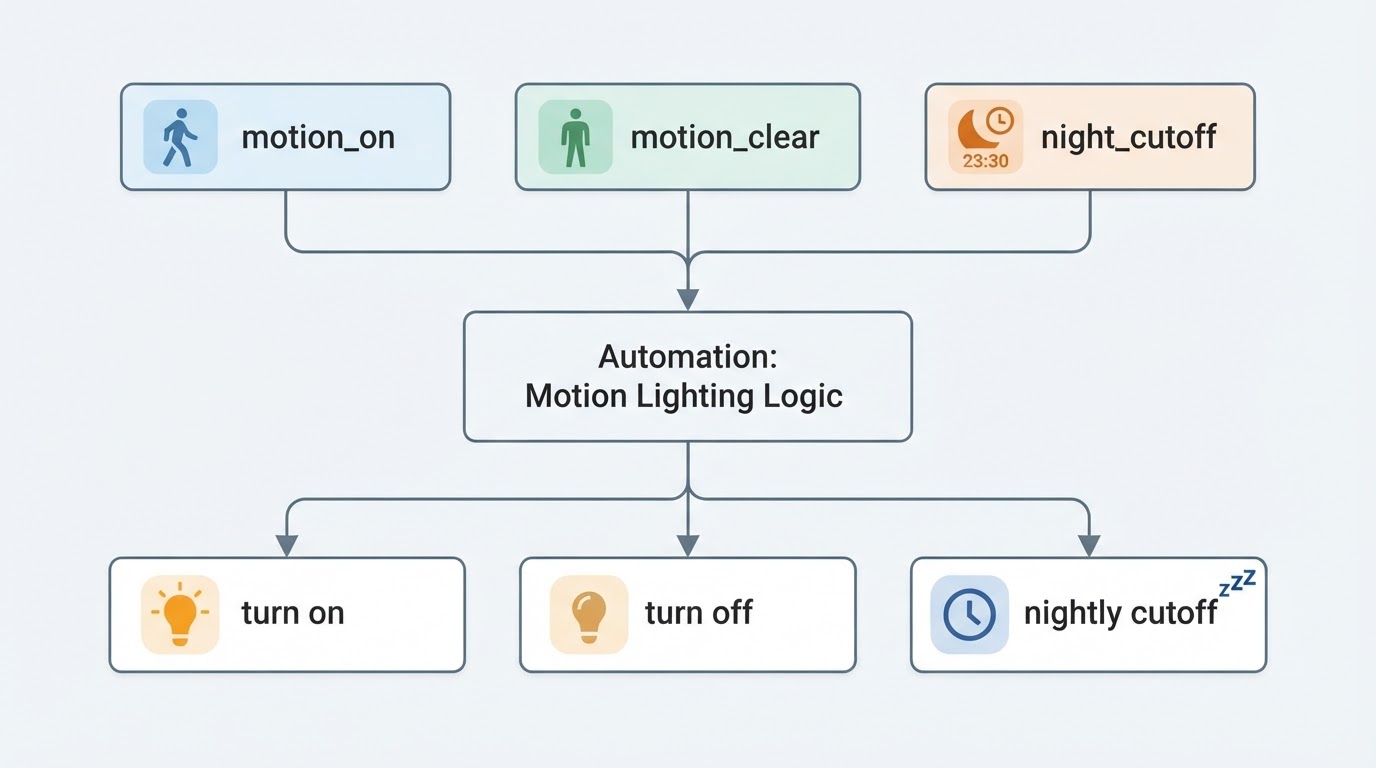
Picture the hallway at dusk: the ceiling light is off, a motion sensor watches the top of the stairs, and the first person to walk through should get light for the next few minutes. Three moments matter — motion starts, motion ends, and a nightly cutoff that turns the light off if it is still on at 23:30.

Written as one automation with three trigger ids, it is one behaviour with three entry points. The trigger id is the handle the choose block reaches for: each trigger carries a name, and each branch declares which name it answers.
This example is illustrative, not a claim that it was tested on a particular home network. Replace the sample entity IDs with entities that actually exist in your Home Assistant instance.
The YAML: trigger ids routed by choose
The example below follows the shape shown in Home Assistant's automation documentation: each entry in triggers: carries an id, and the actions: list routes on a condition: trigger that matches the id. Swap the entity ids for your own and keep the trigger names.
alias: "Hallway lighting - motion on, motion clear, nightly cutoff"
description: "One automation, three triggers, each routed by trigger id."
triggers:
  - trigger: state
    entity_id: binary_sensor.hallway_motion
    from: "off"
    to: "on"
    id: motion_on
  - trigger: state
    entity_id: binary_sensor.hallway_motion
    from: "on"
    to: "off"
    for: "00:03:00"
    id: motion_clear
  - trigger: time
    at: "23:30:00"
    id: night_cutoff
actions:
  - choose:
      - conditions:
          - condition: trigger
            id: motion_on
          - condition: numeric_state
            entity_id: sensor.hallway_illuminance
            below: 40
        sequence:
          - action: light.turn_on
            target:
              entity_id: light.hallway
            data:
              brightness_pct: 60
      - conditions:
          - condition: trigger
            id: motion_clear
        sequence:
          - action: light.turn_off
            target:
              entity_id: light.hallway
      - conditions:
          - condition: trigger
            id: night_cutoff
        sequence:
          - action: light.turn_off
            target:
              entity_id: light.hallway
mode: single
Three details are worth pointing out:
- The
motion_onoption holds two conditions — the trigger id and an illuminance check — so the light only comes on when the hallway is actually dark. motion_clearandnight_cutoffend in the same action, but they stay separate options so the trace shows which trigger ended the run.- Home Assistant runs the first option whose conditions pass, so the narrow options sit above anything broader. Add a
default:sequence when a run should still leave the house in a known state if no option matches.
The syntax for matching an id is documented with the other conditions: condition: trigger with one id, or a list of ids when a single branch should answer several triggers.
Manual runs have no trigger context
This is the part that surprises people. When you press Run actions in the automation editor, Home Assistant executes the actions while skipping every trigger and every top-level condition. No trigger fired, so no trigger id exists, and each condition: trigger in the choose block evaluates false. The troubleshooting documentation states it plainly: any trigger ID used in your triggers will not be active when you test this way, and the trigger data passed in conditions or actions cannot be tested directly. The trace of a manual run has no trigger attached at all.
A branch that stays silent during Run actions is therefore not a diagnosis. The shortcut cannot exercise trigger ids by design.
A safe way to test each branch
- Check the YAML before anything runs: open Settings > Tools > YAML and use Check configuration to catch syntax errors.
- Reload automations from the same Tools page so the new trigger ids are registered.
- Test one branch by causing its real trigger in a safe way — for example, walk past the sensor or temporarily use a short
forduration on a test light, never on a safety-critical device. - Open Traces and inspect which trigger fired, which choose option matched, and whether the target light actually changed. Trace retention can vary with automation configuration.
- Treat a trace from a real trigger plus the observed device result as evidence that the branch works. A manual Run actions test does not prove trigger-id routing.
Which branching pattern to use
Situation | Better pattern | Why |
|---|---|---|
One sensor's on and off moments drive one light | One automation, two ids, two branches | On and off logic stays in one trace |
Several triggers should produce the same action | One automation, one shared id | Ids may repeat, so both triggers land in one branch |
Different triggers need different actions or brightness | One automation, ids plus choose | One trace shows which path ran |
The automation collects unrelated responsibilities | Split it into separate automations | A large choose tree is hard to read and hard to test |
You need to test one branch safely | Trigger a disposable test entity or the real sensor, then inspect Traces | Run actions skips the trigger id entirely |
Limits and mistakes worth knowing
- An implicit id is a position, not a name. Because the fallback is the trigger's index, inserting a new trigger above an existing one renumbers everything below it. Set explicit ids before the list grows.
- A trigger id is not an automation id. The automation's own top-level
idis what makes traces available for YAML-created automations; trigger ids only route branches inside a run. - Top-level conditions are skipped on manual runs too. If branch-critical checks should be testable, keep them inside the choose options rather than above the actions.
- Order decides. Put narrow options first and the broad fallback last, and pick
mode: singleversusmode: restartdeliberately if a chatty sensor can fire twice in a second.
FAQs
Can two triggers in the same automation share one id? Yes. The id does not have to be unique, which is how different triggers are grouped into one branch — a door contact and a motion sensor can both carry hallway_light_on and share one sequence.
What is the id if I never set one? It defaults to the trigger's index, starting at 0. A trigger condition will accept "0" or 0, but that number changes whenever the trigger list is reordered, so names survive editing.
Why did my choose branch not run during a test? Because Run actions skips the triggers and top-level conditions, so no trigger id is available and every Triggered-by condition fails. Fire a safe real event, then check the trace. For a different scheduling intent, see the site's every-five-minutes automation guide.