What the three pieces actually do
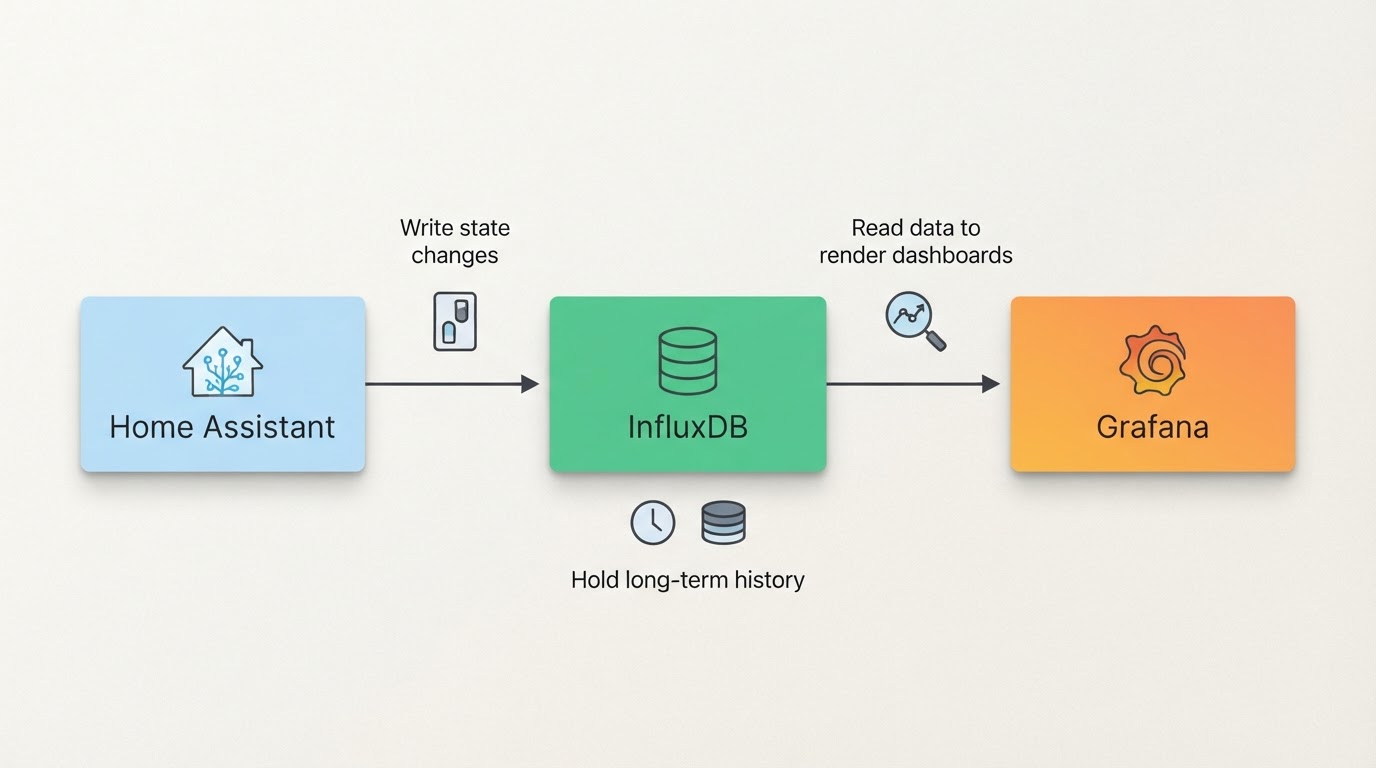
Home Assistant, InfluxDB, and Grafana solve three different problems, and mixing up their roles is the most common reason people get stuck half way through a migration.
Home Assistant's own recorder database is built for the live experience: the logbook, the history panel, and recent state. It is not designed to hold years of high-resolution history, and every entity you record makes it heavier.
InfluxDB is a time-series database. Home Assistant exports state changes to it, and once the data is there it is optimized for range queries: last month's heating cycles, last winter's humidity, this year's energy trend.
Grafana is the visualization layer. It does not produce data and it does not store it. It queries a data source, your InfluxDB instance, and renders panels from the result.
Two consequences follow. First, InfluxDB does not replace the recorder; you keep both. Second, the export is a one-way pipeline: Home Assistant writes to InfluxDB, Grafana reads from it. Design the pipeline in that direction and the remaining decisions fall into place.
Decide what deserves long-term history
Long-term history earns its storage when you would make a decision from it: energy consumption, heating behavior, indoor air quality, sensor drift, or whether a device is actually doing what it claims.
Everything else is noise. Device trackers, chatty power meters, and raw signal-strength values can change state hundreds of times a day, and exporting all of them creates two problems: storage that grows forever, and queries that get slower because the useful series are buried in the noise.
A rough way to size the export before you commit to it: estimate the number of entities you want to keep, multiply by how often each one changes state per hour, then multiply by the number of hours you want to retain. The estimate does not need to be precise. It only has to tell you whether you are planning a few million points a month or a few hundred million.
Use the InfluxDB integration's include and exclude options to scope the export to that list, and tag the data in a way your future queries can use, such as a room, a device class, or a subsystem. Tags are indexed, so keep them low-cardinality: a tag like a room name is fine, a tag that carries a unique value per reading is not.
Baseline before you change anything
A migration fails more often from missing information than from missing tools. Before touching the export or the database, write down four things.
- Where history lives right now: the Home Assistant InfluxDB configuration, the InfluxDB version, and whether it runs as an add-on or on its own host.
- Which dashboards depend on it: open each Grafana dashboard and note the data source and the main query behind it.
- How much history actually matters: the oldest range anyone reads.
- What done looks like: the queries that must return the same result after the move.
Then take the backups. Snapshot or export the existing InfluxDB data directory, export the Grafana dashboards as JSON, and save a copy of the Home Assistant configuration that feeds the export. A backup you have not tested is a hope, not a plan, so restore one copy somewhere harmless and confirm it opens.
Setting up the export
The integration needs four things from you: where InfluxDB is reachable on the network, which database or bucket to write into, the credentials that allow writing, and a decision about what to export.
On InfluxDB 1.x that means a host, a port, a database name, and a username and password. On InfluxDB 2.x the model changes: you need an organization, a bucket, and a token, and the retention period lives on the bucket. The integration supports both versions, but the values you supply are different, and a 1.x configuration dropped into a 2.x setup will simply fail to authenticate.
Scope the export deliberately. Start with a small include list, the entities from the previous section, and add to it later. A narrower export is easier to verify, easier to migrate, and cheaper to keep.
The expected output of this step is boring and specific: new points appearing in InfluxDB with the right timestamps and units, and one Grafana panel reading them. Do not move on to migrating old data until that panel updates on its own. A working live write path is the foundation everything else sits on.
Migrating InfluxDB 1.x data to InfluxDB 2.x
The version change is mostly a change of vocabulary. Databases become buckets. Retention policies become bucket retention settings. Users and passwords become tokens. InfluxQL, the 1.x query language, gives way to Flux, though InfluxDB 2.x also exposes a 1.x compatibility API with database-to-bucket mappings so InfluxQL clients can keep working during the transition.
That compatibility layer matters for Grafana. If your dashboards query InfluxQL, keeping the mapping in place is the difference between changing a data source and rewriting every panel.
There are three practical migration strategies.
- Dual write and backfill. Point Home Assistant at the new bucket, export the historical range from the old instance, and import it into the new one. The old instance stays available for comparison.
- Export, import, then cut over. Move the existing data first, verify it, then switch the export target. There is a clean moment where all written history lives in the same place.
- Fresh start with a read-only archive. New data goes to the new bucket, and the old instance keeps running in read-only form for historical queries. This is the lowest-risk option and the least tidy, because you now own two databases.
Whichever path you pick, the order of operations is the same: back up, stand up the new instance, create the organization, bucket, and token, map the old database and retention policy if you rely on InfluxQL, point Home Assistant at the new target, move or backfill history, then verify.
Verification is where migrations are won. Compare aggregates, not impressions: sum or count a known metric over a fixed window in both databases and check that the numbers agree. Inspect the cutover window for gaps. Then open a dashboard that queries the longest range you care about and confirm it renders.
Keep Grafana dashboards working
Create the new InfluxDB data source in Grafana and leave the old one in place. Keep both connections until verification is done. Connecting the new source and deleting the old one in the same sitting removes your ability to compare.
If the dashboards use InfluxQL and the compatibility mapping is in place, most panels should render without edits. If you plan to rewrite queries in Flux, do it one dashboard at a time, on a copy, so a broken query never costs you the original.
Watch for the changes that break panels quietly rather than loudly: a renamed measurement, a retention policy that no longer applies, a tag that became a field, or a timezone shift that moves a daily aggregate. A panel showing a flat line is more dangerous than a panel showing an error, because a flat line looks like a real answer.
The mistakes that cost the most
- Exporting everything. Every entity you add increases storage and dilutes query performance. The export list should be a decision, not a default.
- Skipping the retention and downsampling plan. Raw state changes are useful for a few weeks and expensive for years. Decide what gets downsampled into longer-interval aggregates before the data grows.
- Changing the schema and the backend at the same time. If measurement names, tags, and the database version all change in one weekend, a missing panel can have three possible causes. Change one variable at a time.
- Deleting the old database too early. Keep the old instance until you have checked the ranges you actually use, and keep the backup longer than that.
- Assuming InfluxDB shrinks the recorder. It does not. Home Assistant still needs its recorder database, still needs pruning, and will still slow down if it records every chatty entity forever.
- Treating a successful import as a successful migration. Until a Grafana panel answers a real question from the new data, the migration is not finished.
A completion standard you can check
Pick a stabilization window and hold yourself to it. A reasonable standard looks like this.
- New data has been flowing into the new InfluxDB for the whole window, with no unexplained gaps.
- Three spot checks, one recent range, one mid-range, and one at the oldest retained data, return the same aggregates as the old instance.
- Every dashboard you care about renders, and any panel you changed has a note explaining why.
- The old instance is still running or the backup is retained, and the rollback step is written down.
- The export list is documented, so the next person who adds an entity knows whether it belongs in long-term history.
Rollback is simple if you planned it: point Home Assistant back at the old instance and restore the previous Grafana data source. Keep that option available until the stabilization window has passed.
One documented end-to-end run
If you want to compare your plan against a real one, ConnectedCasa's infrastructure project log describes moving five years of Home Assistant history (400+ million rows) off the InfluxDB 1.x add-on and onto a standalone InfluxDB 2.x virtual machine, with its existing Grafana dashboards left intact. It is a useful reference precisely because it documents the messy part, the backup mix-up and the steps that finally worked, rather than presenting a clean-room install. Work through your own baseline and completion standard first, then read that build log with your checklist in hand.