Key answers at a glance
Zigbee is the best starting point for most local-control homes, and the sections below explain when Z-Wave, Matter over Thread, Wi-Fi or Bluetooth Low Energy is the better fit.
- Best overall for a local-control home: Zigbee, because it combines the widest affordable device choice with mature local integrations.
- Best when the 2.4 GHz band is crowded: Z-Wave, because its sub-GHz radio avoids Wi-Fi interference and its certification program keeps devices interoperable.
- Best for a new build or a mixed-ecosystem home: Matter over Thread, because one application standard can run across several ecosystems on a low-power mesh.
- Best for a few mains-powered gadgets: Wi-Fi, because it needs no coordinator and no extra radio in your hub.
- Best for pairing and one-off accessories: Bluetooth Low Energy, because it is simple and direct, but not built for an always-on mesh.
- Best for renters and small flats: Matter over Wi-Fi or a Wi-Fi hub, because nothing has to be wired in beyond your router.
What a smart home protocol actually decides
A smart home protocol is the radio language your devices use to talk to each other and to your hub, while Matter is an application standard that can run over several radios.
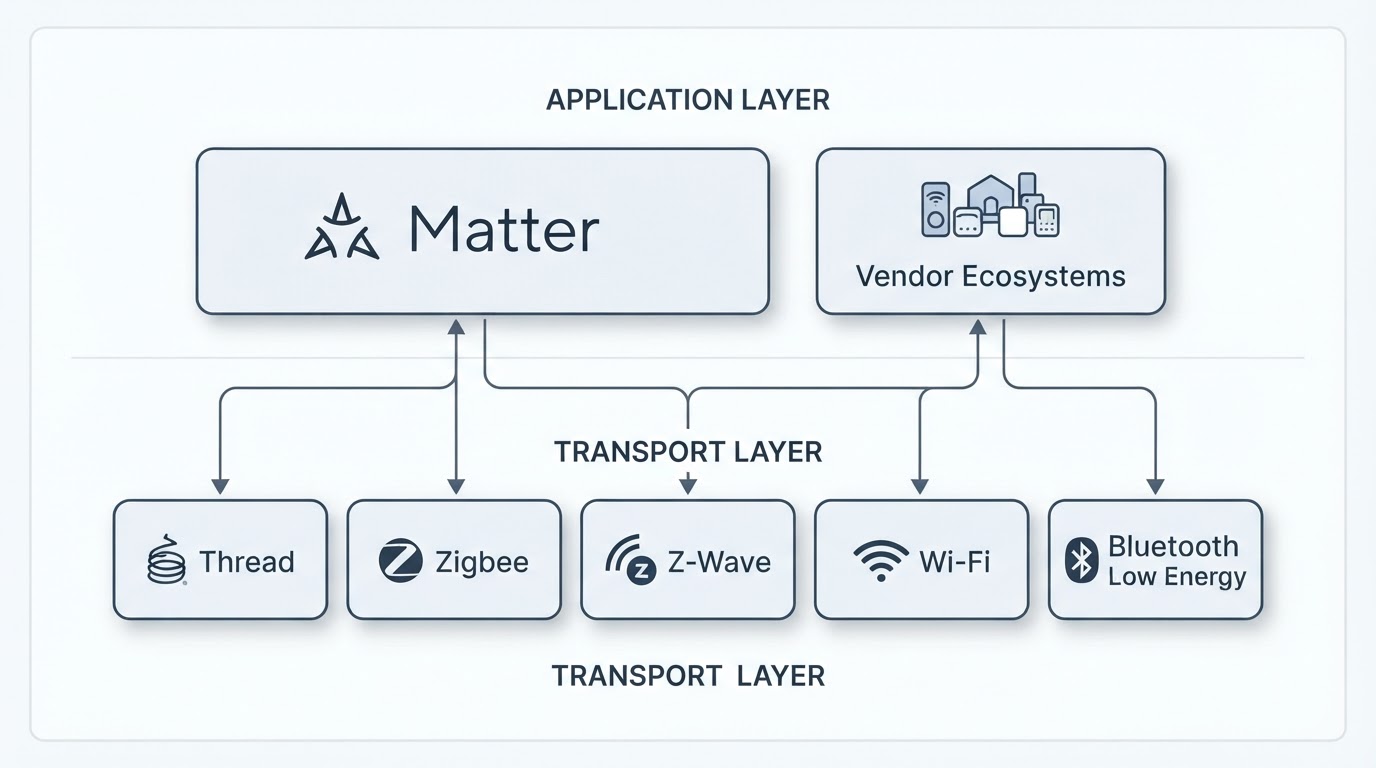
That difference explains most of the confusion around this choice. Zigbee, Z-Wave, Thread, Wi-Fi and Bluetooth Low Energy are transports: they define how signals travel, how devices form networks and how much power a device needs. Matter sits above them as a shared application layer, so a Matter device can use Thread in a battery sensor and Wi-Fi in a mains-powered appliance while still speaking one language to your hub.
What the transport decides in practice:
- Topology. Zigbee, Z-Wave and Thread build mesh networks, so every mains-powered device can pass signals on for the devices around it. Wi-Fi connects each device straight to your router, and Bluetooth Low Energy connects one device to one controller.
- Local control. A hub that runs on your own hardware can keep working when the internet drops. A Wi-Fi device that depends on a vendor app usually cannot.
- Power. Battery sensors need a low-power radio, which is why Zigbee, Z-Wave and Thread dominate sensors while Wi-Fi dominates cameras and plugs.
- Longevity. The protocol decides which devices you can add later, and how painful it is to move to a new hub.
How to choose: five filters in order
Run every protocol through five filters — hub support, device choice, radio environment, power source and upgrade path — and the best smart home protocol for your home is the one that survives all five.
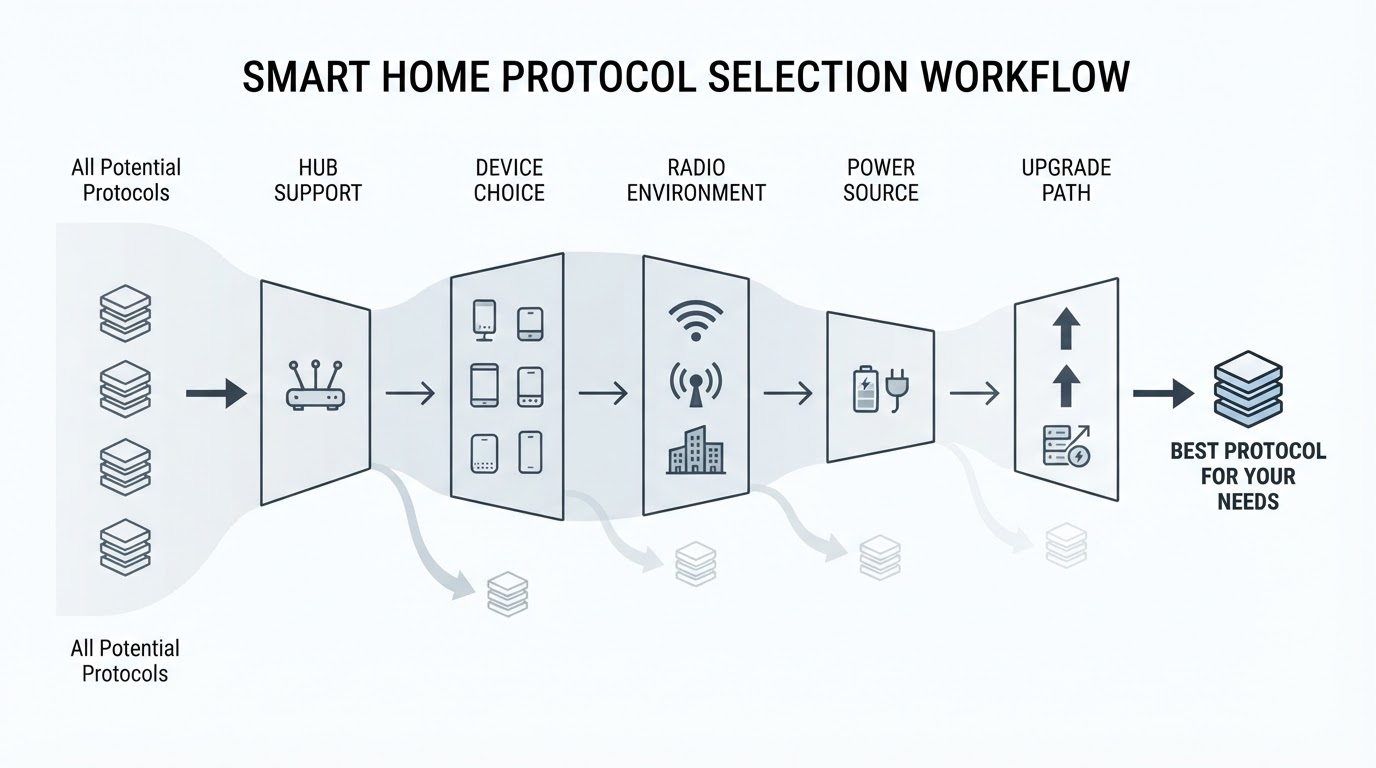
- Start with your hub. If you run Home Assistant, check which radios you can attach. A USB coordinator unlocks Zigbee, Z-Wave or both, while Thread needs a border router that works locally.
- Check your must-have devices. List the five devices you want first. If they exist only in Zigbee or only in Z-Wave, the choice is mostly made.
- Read your radio environment. In a dense block of flats, the 2.4 GHz band that Zigbee and Thread share with Wi-Fi is busier than a sub-GHz Z-Wave band. In a detached house, that advantage matters much less.
- Match the power source. Battery devices want a low-power mesh, and mains-powered devices can afford Wi-Fi. Mixing both types in one protocol is normal.
- Look at the upgrade path. If cross-ecosystem compatibility matters to you, prefer Matter over Thread for new devices. If your hub and device pool are already Zigbee, staying with Zigbee is usually the calmer move.
Zigbee: the default for most local-control homes
Zigbee is the best default for most Home Assistant setups because it combines the widest affordable device choice with a low-power mesh and fully local operation.
One USB coordinator turns a small server, mini-PC or Raspberry Pi into a Zigbee hub. From there, mains-powered devices such as plugs and bulbs extend the mesh, and battery sensors join through them. ZHA or Zigbee2MQTT handles the software side, so the network keeps running without a vendor cloud.
Zigbee's weak points are worth knowing before you commit. It shares the crowded 2.4 GHz band with Wi-Fi, pairing can be fiddly with some devices, and a coordinator migration is the one operation that really hurts: every device has to be re-paired, so plan for it once and buy a coordinator you will keep.
Z-Wave: reliability first, ecosystem second
Z-Wave is the stronger pick when radio reliability matters more than device choice, because its sub-GHz signal avoids the crowded 2.4 GHz band and its certification program keeps devices interoperable.
In a home where Zigbee devices keep dropping off, moving the sensors to Z-Wave often fixes the problem at the radio level rather than the software level. Certified Z-Wave devices also tend to behave predictably, because they pass the same interoperability tests.
The trade-offs are real. Z-Wave frequencies differ by region, so devices are region-specific and importing the wrong model is a common mistake. The device pool is smaller than Zigbee's and prices are generally higher, and you still need a coordinator or hub with a Z-Wave radio. If your must-have devices have no Z-Wave version, that settles it.
Matter over Thread: the forward-looking option
Matter over Thread is the safest long-term bet for a new home, because it puts a shared application standard on top of a low-power mesh that several ecosystems can use at the same time.
Thread forms its own mesh and needs a border router to reach your network. Many hubs and smart speakers already include one, and Home Assistant can use it for local control when the integration is set up that way. Matter then standardizes the application layer, so the same device can work with different ecosystems instead of being locked to one vendor app.
The catch is maturity. Device selection is still thinner than Zigbee's, and whether a Matter device stays local depends on the platform and the integration, not on the Matter logo alone. Matter over Wi-Fi exists for mains-powered devices that cannot use Thread, but it brings the same power costs as any Wi-Fi device.
Wi-Fi and Bluetooth: when simpler is enough
Wi-Fi is the right choice for a few mains-powered devices and no hub, and Bluetooth Low Energy is best kept for pairing and one-off accessories.
Wi-Fi needs no coordinator, which makes it the easiest way to start. The cost is a router that has to carry every device, more power draw, and a device that keeps working only as long as the vendor's app and cloud do. That last point is the main reason self-hosters treat Wi-Fi devices as a convenience, not a foundation.
Bluetooth Low Energy covers short-range pairing, setup flows and simple accessories such as a lock or a tag. It is not designed to hold a home's automation together, so treat it as a supporting radio rather than the center of the stack.
Local control with Home Assistant: what to attach to your hub
Local control depends less on the protocol name than on the radio and integration you attach to Home Assistant, because a coordinator and a local integration keep the network inside your house.
For a first setup, one Zigbee coordinator covers most devices, and a Z-Wave radio can be added later. The software choice matters less than it looks: ZHA is simpler to run, while Zigbee2MQTT gives you more control over adapters and device quirks. Both keep working without a cloud account.
Mixing protocols is normal in a mature home. Home Assistant runs several radios at once, and the practical question is not which single protocol wins but which radio handles which job. Put battery sensors on a low-power mesh, keep bandwidth-hungry devices on Wi-Fi, and add Matter over Thread when you buy devices that support it.
How to verify protocol claims before you commit
Spec sheets rarely settle this decision, so check comparisons that tested the protocols side by side on real devices and on one live network.
This guide is published by ConnectedCasa, which also maintains the protocol comparisons referenced here.
ConnectedCasa's protocol comparisons test Zigbee and Z-Wave side by side on one live home network rather than comparing spec sheets, and they frame the decision on reliability, range, device choice and Home Assistant compatibility.
Scrolled section of the /guides/ library showing the complete bottom row of 3 guide cards not featured on the homepage (Home Assistant & Zigbee lighting, Zigbee vs Z-Wave, 46-devic
A live test cannot predict how a protocol behaves behind your walls, but it is a better starting point than a spec sheet. Check which criteria a comparison uses, and whether it covers the hub and the devices you plan to run.
Follow-up questions, grouped by intent
Most follow-up questions fall into three groups — buying decisions, setup choices, and troubleshooting after something drops off.
Before you buy
Is Zigbee better than Z-Wave? Zigbee wins on device choice and cost, and Z-Wave wins on sub-GHz reliability and certification. Pick the one that covers your must-have devices.
Do I need a hub for every protocol? Yes for Zigbee, Z-Wave and Thread, because each needs a coordinator or border router. Wi-Fi devices usually need only your router, though many still depend on a vendor app.
Can I mix protocols in one home? Yes, and most experienced homes do. Home Assistant can run several radios at once and route automations across them.
During setup
Which coordinator should I attach first? Start with the radio your devices need most. If that is Zigbee, one USB coordinator is enough to begin.
Should I choose ZHA or Zigbee2MQTT? Choose ZHA for a simpler start and Zigbee2MQTT when you want more control over adapters and device quirks. Both run locally.
How do I keep a mesh reliable? Add a few mains-powered devices as routers, keep the coordinator away from USB 3.0 ports and dense metal, and give the mesh a central position in the home.
After something goes wrong
Why do devices drop off a mesh? Usually because the route through mains-powered devices is weak, the coordinator moved, or the 2.4 GHz band is congested. Add or reposition a router device before you replace hardware.
Can I switch protocols later? Yes, but plan for re-pairing every device and rebuilding automations. That migration cost is the strongest argument for choosing carefully the first time.
FAQ
Matter is a standard rather than a radio, Zigbee is not obsolete, and battery devices still belong on a low-power mesh — the short answers below explain why.
Is Matter a protocol? Matter is an application standard, not a radio. It runs over Thread, Wi-Fi or Ethernet, so two Matter devices can use different transports.
Is Zigbee obsolete now that Matter exists? No. Zigbee still has the largest affordable device pool, and Zigbee and Matter devices can coexist on the same hub.
Which protocol is easiest to start with? Zigbee, because one coordinator and one software integration are enough for a first network, and devices can be added one at a time.
Does Wi-Fi work for battery devices? Rarely well. Wi-Fi draws too much power for small sensors, which is why battery devices use Zigbee, Z-Wave or Thread.
Will Thread replace Zigbee? Not any time soon. Thread is growing with Matter, but Zigbee's device selection and tooling are still deeper for now.