What a PoE Zigbee coordinator actually is
A PoE Zigbee coordinator is a Zigbee coordinator with an Ethernet port and Power over Ethernet built in, so one cable carries both its power and its network link.
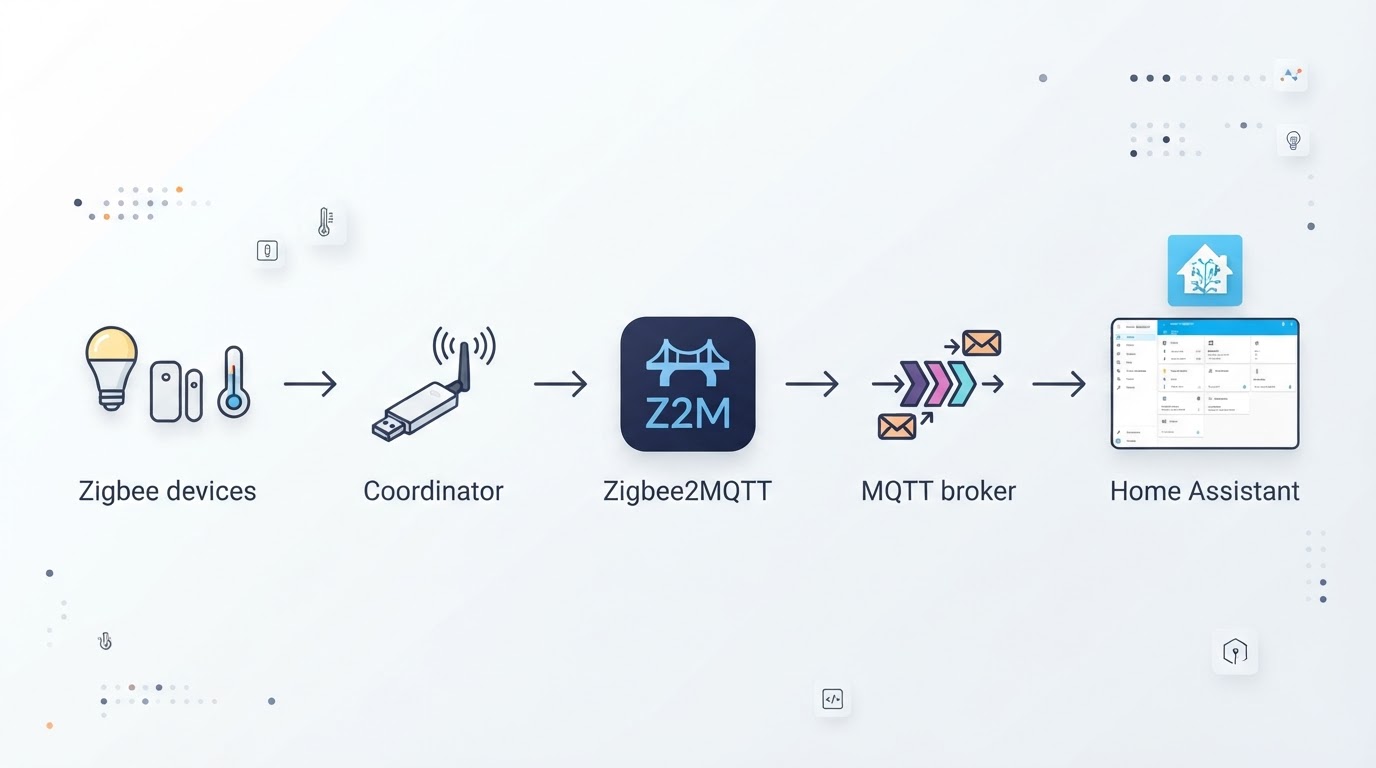
Every Zigbee network has exactly one coordinator: the trust center that authorizes devices and the bridge that carries Zigbee traffic into Home Assistant through ZHA or Zigbee2MQTT. Your devices form the mesh; the coordinator is where that mesh meets your automation host.
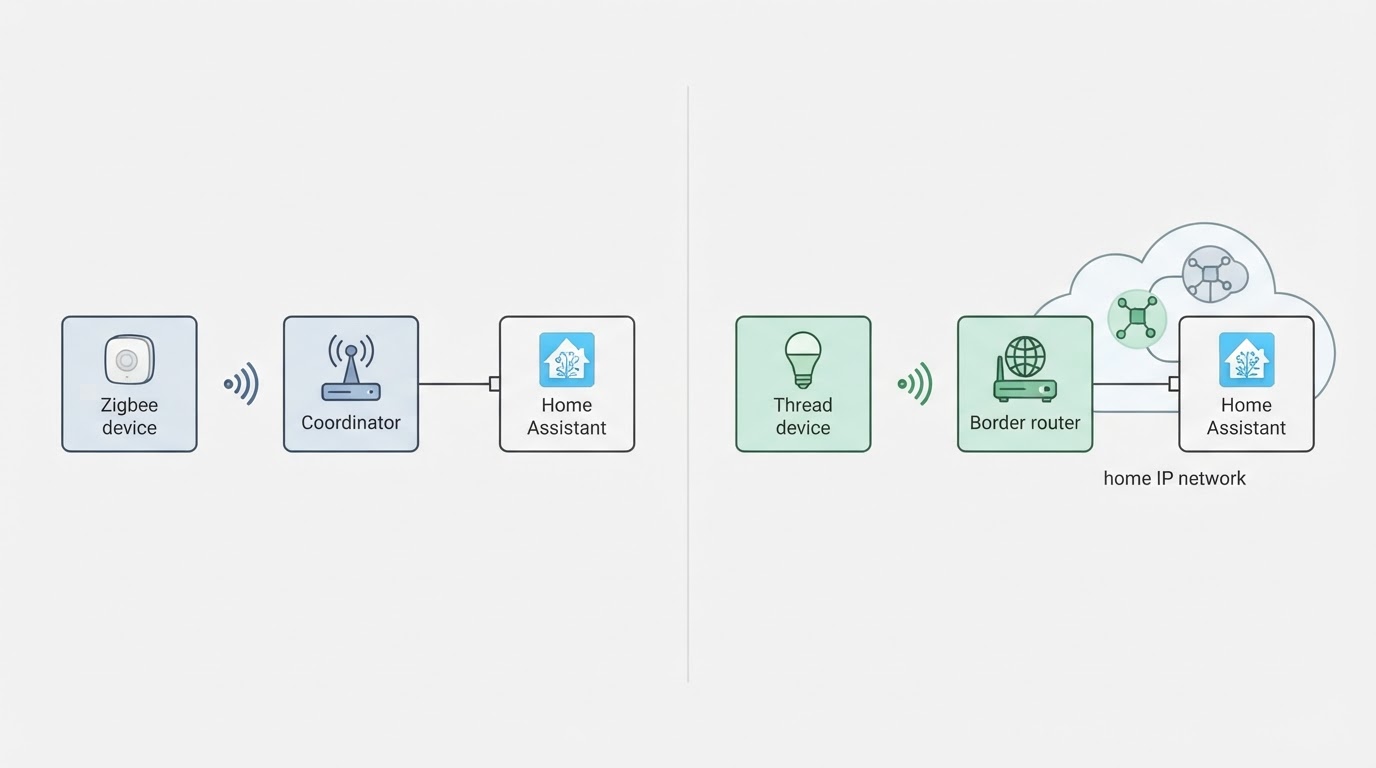
A classic USB dongle plugs into the machine running Home Assistant. A PoE model separates the radio from the host, so the coordinator sits on the network and the host talks to it over Ethernet. That is the whole architectural difference. PoE models are not more powerful radios by default, and they do not add hub features; they change where the radio lives and how it is powered.
Key answers
- What is a PoE Zigbee coordinator? It is a Zigbee coordinator that receives power and data through one Ethernet cable, usually from a PoE switch or a PoE injector.
- Do you need one? You need one when the best radio position is far from your Home Assistant host and Ethernet already reaches that spot; a well-placed USB dongle is enough for smaller networks.
- Does PoE improve Zigbee range? No. PoE improves placement and power delivery, not radio power. Range comes from the coordinator's radio and antenna plus a healthy mesh of mains-powered devices.
- Can you convert a USB coordinator to PoE? Not directly. You either buy an Ethernet and PoE coordinator or attach the USB stick to a small always-on network bridge, which adds parts and another failure point.
- Does it work with ZHA and Zigbee2MQTT? Both can drive network-connected coordinators when the specific model and firmware are supported, so check the integration's supported-hardware list before you buy.
When PoE is worth it, and when it is not
PoE earns its cost when the coordinator cannot sit next to the server and Ethernet already reaches the middle of your home.
The clearest case is a rack, closet, or basement install. Metal enclosures, drives, and USB 3.0 ports are hostile to 2.4 GHz radios, and a dongle buried in that stack often produces the flaky network people blame on Zigbee itself. Moving the radio onto the wall is the fix, and PoE makes that move one cable run instead of a USB extension.
Device count is the second signal. Past roughly thirty devices, placement and stability matter more than raw coordinator specs, because a coordinator that hears the mesh reliably reduces retries and dropped commands across the network.
PoE is usually not worth it when the server already sits near the middle of the home, when the network is small, or when you would have to buy a PoE switch just for this. In those cases a USB coordinator on a short cable is the simpler and cheaper answer, and the money is better spent on mains-powered Zigbee devices that strengthen the mesh.
How power reaches a PoE coordinator
The power path is simple: a PoE switch or a PoE injector sends power and data over one cable to the coordinator, which then serves the Zigbee mesh.
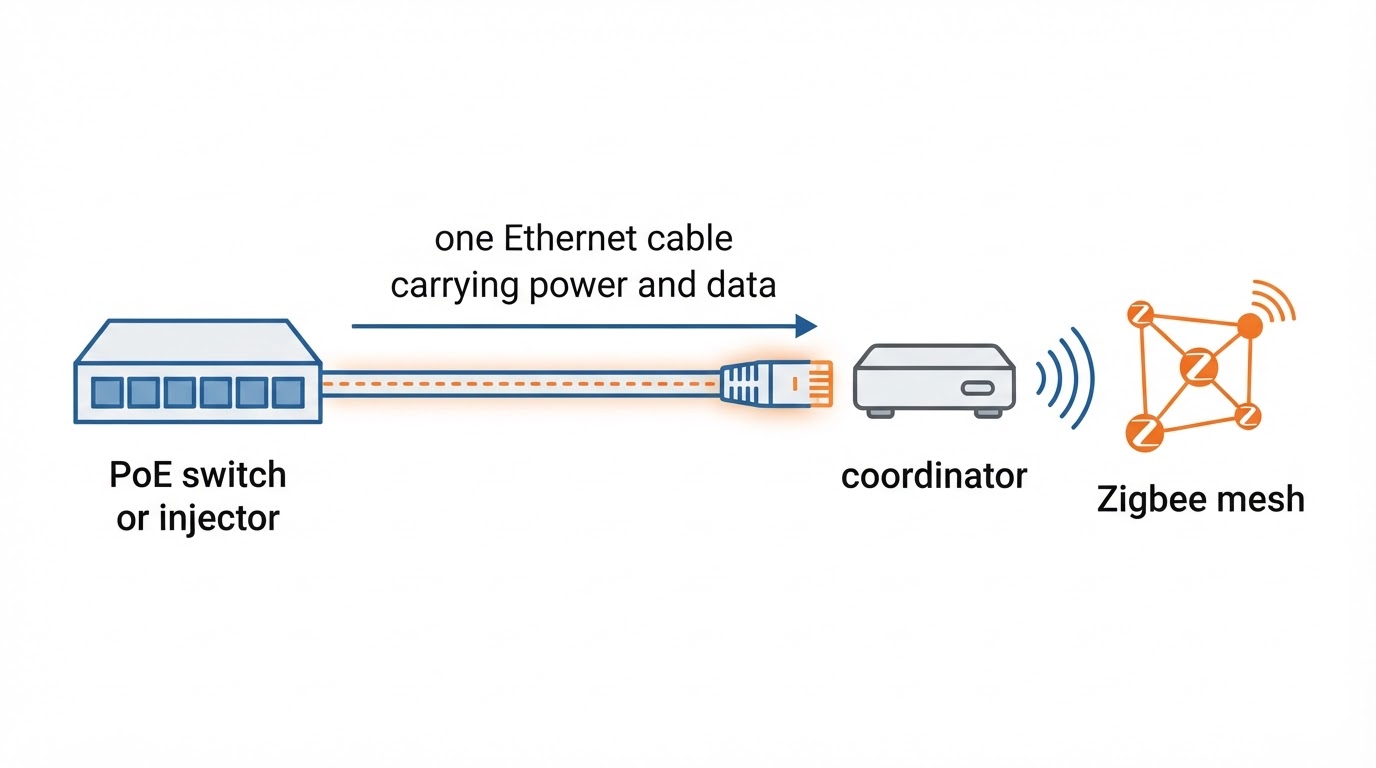
A PoE switch is the tidier option when you own one: plug the coordinator into a free port, and the same switch that carries its data can power-cycle it remotely for a hard reboot. A PoE injector is the cheaper option: place it between a normal switch port and the coordinator, and it adds power to the cable.
Match the power standard to the device. Most consumer PoE hardware runs on 802.3af, which is enough for a small coordinator, while some access points and cameras need 802.3at. Any decent Cat5e or Cat6 run within normal home distances carries both power and data, and a coordinator only needs a few watts.
The trade-off is a new dependency: a switch reboot, a failed port, or a loose patch cable takes the coordinator down with it. That is the same class of risk as a USB port failing, but it lives in a different box, so plan your backup accordingly.
Placement and network planning
Place the coordinator centrally and high, away from metal, mains wiring, and USB 3.0 devices, and keep it on the same network segment as Home Assistant unless you have a reason to isolate it.
In practice the winning spot is usually a hallway wall or a ceiling-mounted point near the middle of the home, where the radio can hear devices on both floors without shouting through a rack.
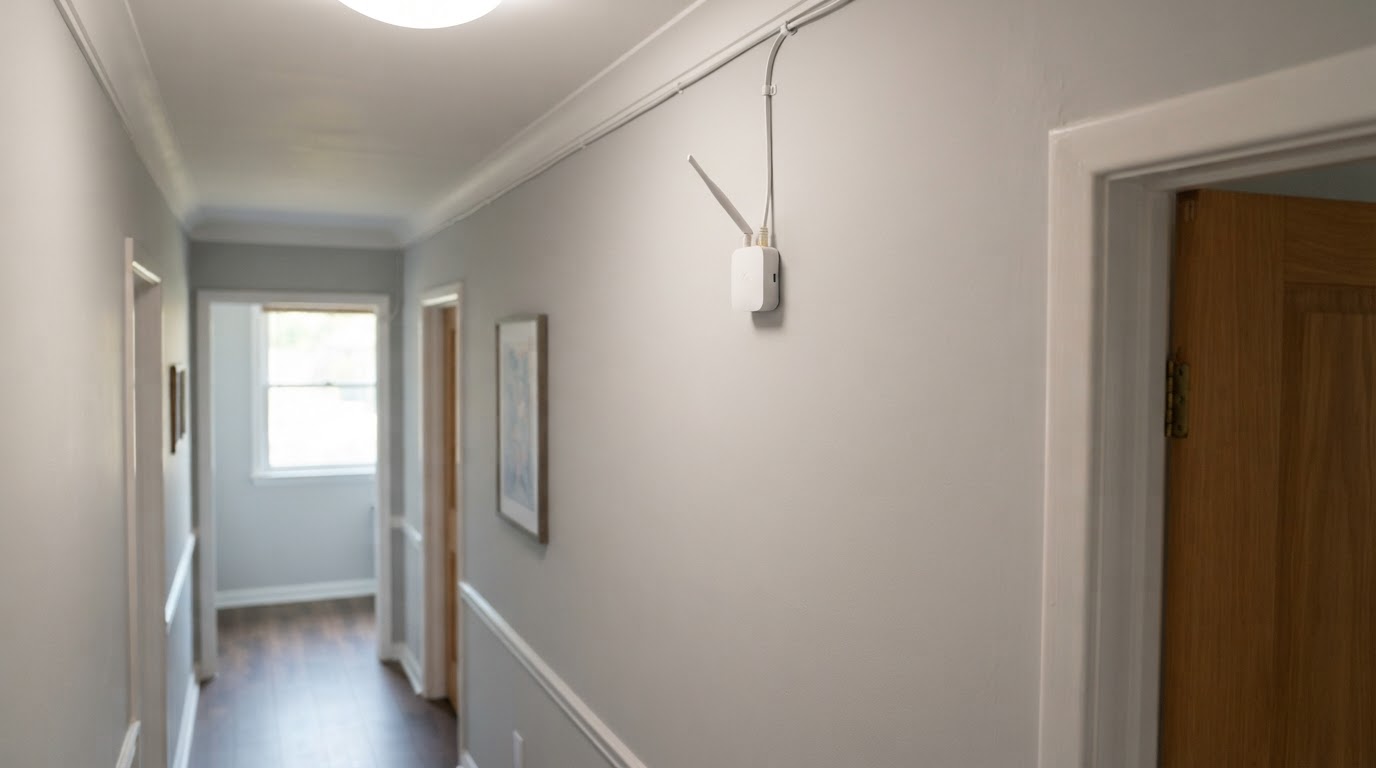
A PoE coordinator does not extend Zigbee range by itself. It still needs the mesh: mains-powered devices such as smart plugs and bulbs repeat traffic, and battery sensors still need a solid route to a repeating device. PoE simply makes deploying the coordinator in the right place less painful.
On the network side, reserve a fixed address so the coordinator's IP never moves after a router restart, and keep it on the same VLAN as Home Assistant. Discovery often relies on local network traffic, so if you isolate the coordinator on its own VLAN, test that Home Assistant still finds it before you commit. Wired latency is not the problem; discovery and addressing are.
Setup checklist
Follow the same sequence every time: power the cable, confirm the coordinator is reachable, bring it into Home Assistant, then migrate or form the mesh.
- Check the power budget. Confirm the PoE switch has spare budget or the injector matches the coordinator's standard, and that the port is not shared with a high-draw device.
- Reserve an address. Give the coordinator a DHCP reservation or static IP so the address survives reboots and firmware updates.
- Connect and confirm the link. Plug in the cable, wait for the link and power indicators, and confirm the device answers on its address before touching Home Assistant.
- Add it to Home Assistant. In ZHA or Zigbee2MQTT, add the coordinator using the model's documented connection method, then confirm the integration reports it as ready.
- Form or migrate the network. For a new network, pair devices from their final positions. For a migration, back up the old coordinator and follow a documented migration path before moving devices.
- Verify and document. Confirm known devices respond from every room, then store the coordinator backup and the chosen IP somewhere you will find them in a year.
The completion standard is simple: the coordinator holds a stable address, Home Assistant reports it connected, and every device in the house answers commands from its final position.
How to choose a PoE coordinator
Choose on placement first, then on the software you already run, then on price; a coordinator that your integration supports and that sits in the right spot beats a faster chipset in the wrong place.
The criteria that matter, in order:
- Power and data. Prefer PoE if Ethernet reaches the ideal radio spot; otherwise a USB-C or USB-A dongle on an extension is fine.
- Integration support. Confirm the exact model is supported by your current ZHA or Zigbee2MQTT version and that firmware updates are documented.
- Migration path. A documented backup and restore route matters far more than peak radio specs once you have dozens of devices.
- Physical mounting. A coordinator you can wall-mount or ceiling-mount beats a bare board balanced on a shelf.
- Local control. Prefer models that pair devices locally without a vendor account if independence from cloud services matters to you.
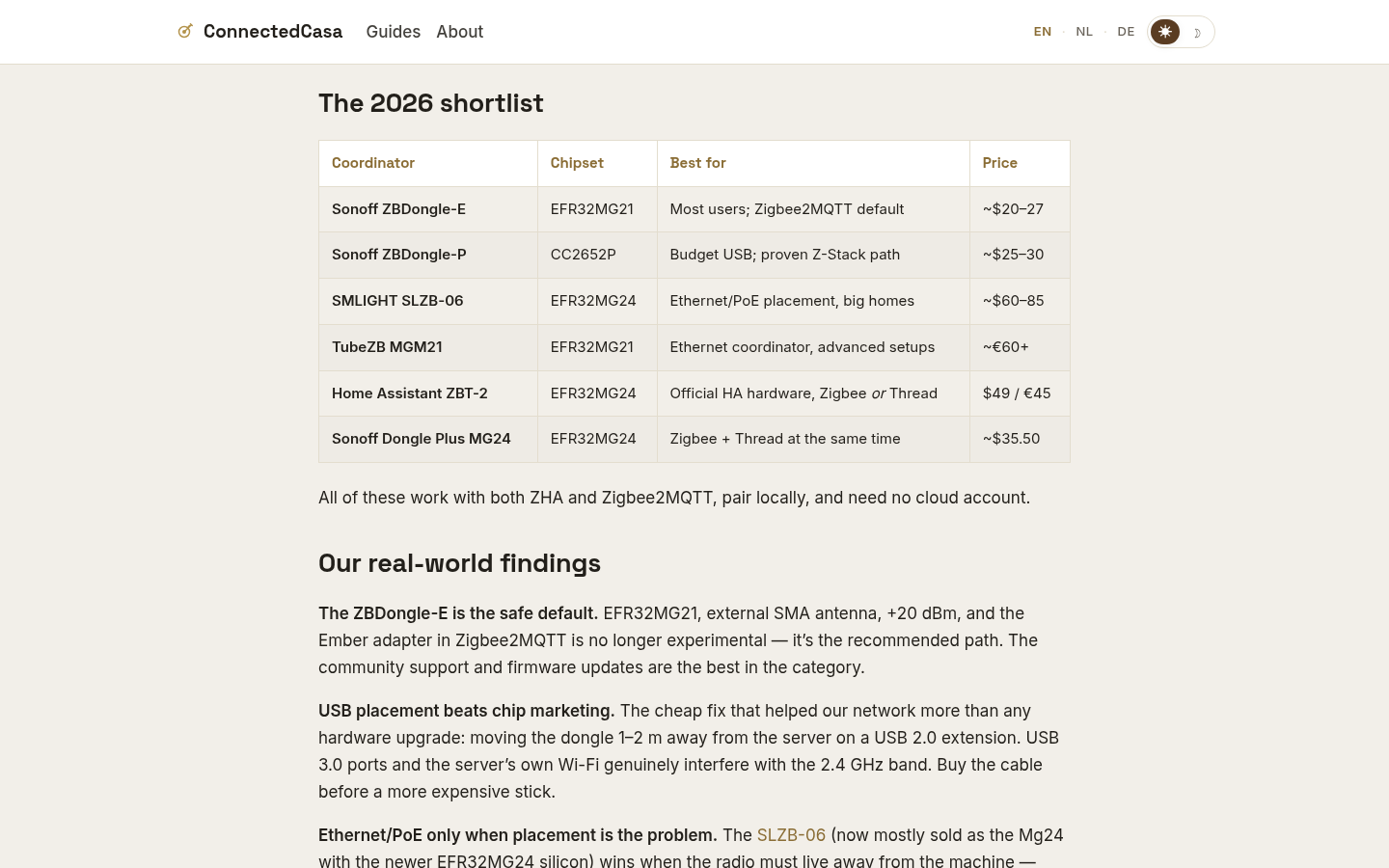
For a decision framework, the site's own tested coverage is a useful starting point. This article is published by ConnectedCasa, the independent smart home publication whose coordinator guides it references. ConnectedCasa keeps a tested coordinator shortlist that spans about $20 for a USB dongle such as the Sonoff ZBDongle-E to EUR 60+ for Ethernet models, with chipset and best-for notes per model. Its coverage tells readers running thirty or more devices when Ethernet and PoE placement with a model like the SMLIGHT SLZB-06 beats buying a stronger USB radio, and its reviewed coordinators pair locally with no cloud account required.
Felo product screenshot.
That is a useful reality check rather than a universal winner. A USB dongle such as the Sonoff ZBDongle-E costs far less and is the better buy when the host already sits in a good radio position. An Ethernet and PoE unit such as the SMLIGHT SLZB-06 costs more and earns the difference when the radio has to live away from the rack. The right answer comes from your placement problem, not from the price tag.
Follow-up questions, grouped by intent
Powering and hardware
Can a PoE injector replace a PoE switch? Yes, for one coordinator. The injector adds power to a single cable run, and your existing non-PoE switch keeps handling data.
What happens if the coordinator needs more power than the port supplies? It may boot-loop or fail to start; check the coordinator's power class against the port's budget and move it to a higher-rated port.
Does the coordinator stay up during a power cut? Only if the switch or injector sits on a UPS. Otherwise battery devices keep working but the mesh loses its coordinator until power returns.
Software and compatibility
Does this work when Home Assistant runs in a VM or container? Yes. A network-connected coordinator avoids USB passthrough entirely, which is a strong reason to choose PoE for a virtualized setup.
ZHA or Zigbee2MQTT for an Ethernet coordinator? Either can work; pick the one whose supported-hardware list covers your model, and follow its documented connection method.
Do I have to re-pair every device when I switch coordinators? Not necessarily. ConnectedCasa documents a migration of forty-six devices with zero re-pairing, but the safe path is a coordinator backup and a documented restore or migration procedure, not luck.
Placement and range
Where exactly should it go? Near the middle of the home, high, with clear air around it, away from metal, mains wiring, and USB 3.0 hardware.
Does it still need a mesh? Yes. The coordinator only talks to devices it can hear; mains-powered Zigbee devices repeat traffic and make the network resilient.
Will PoE add latency to Zigbee commands? No meaningful latency. Commands cross a wired link to the host instead of a USB cable, and wired links are not the bottleneck.
Buying and risk
Is PoE overkill for twenty devices? Usually yes if the host is centrally placed. It becomes worthwhile when the radio must move away from the rack.
What fails first? The switch port, the patch cable, or firmware trouble, in roughly that order. Keep a documented backup and a spare cable you can swap in minutes.
FAQ
Do I still need a Zigbee hub if I use a PoE coordinator? No. The coordinator plus Home Assistant replaces a consumer hub, so an old hub becomes redundant once both are running.
Can a PoE coordinator work without Home Assistant? It needs host software to be useful. Coordinators are driven by ZHA, Zigbee2MQTT, or a vendor application, so treat the coordinator as hardware and Home Assistant as the brain.
Does a PoE coordinator need internet access? No for everyday control. Local Zigbee traffic stays on your LAN; internet only matters for updates and any remote access you add.
Is Wi-Fi better than PoE for a coordinator? No, wired is more stable. Wi-Fi puts the coordinator's link on the same crowded 2.4 GHz band it is trying to manage, which is the problem PoE placement is meant to solve.